ESC-Squad-标记
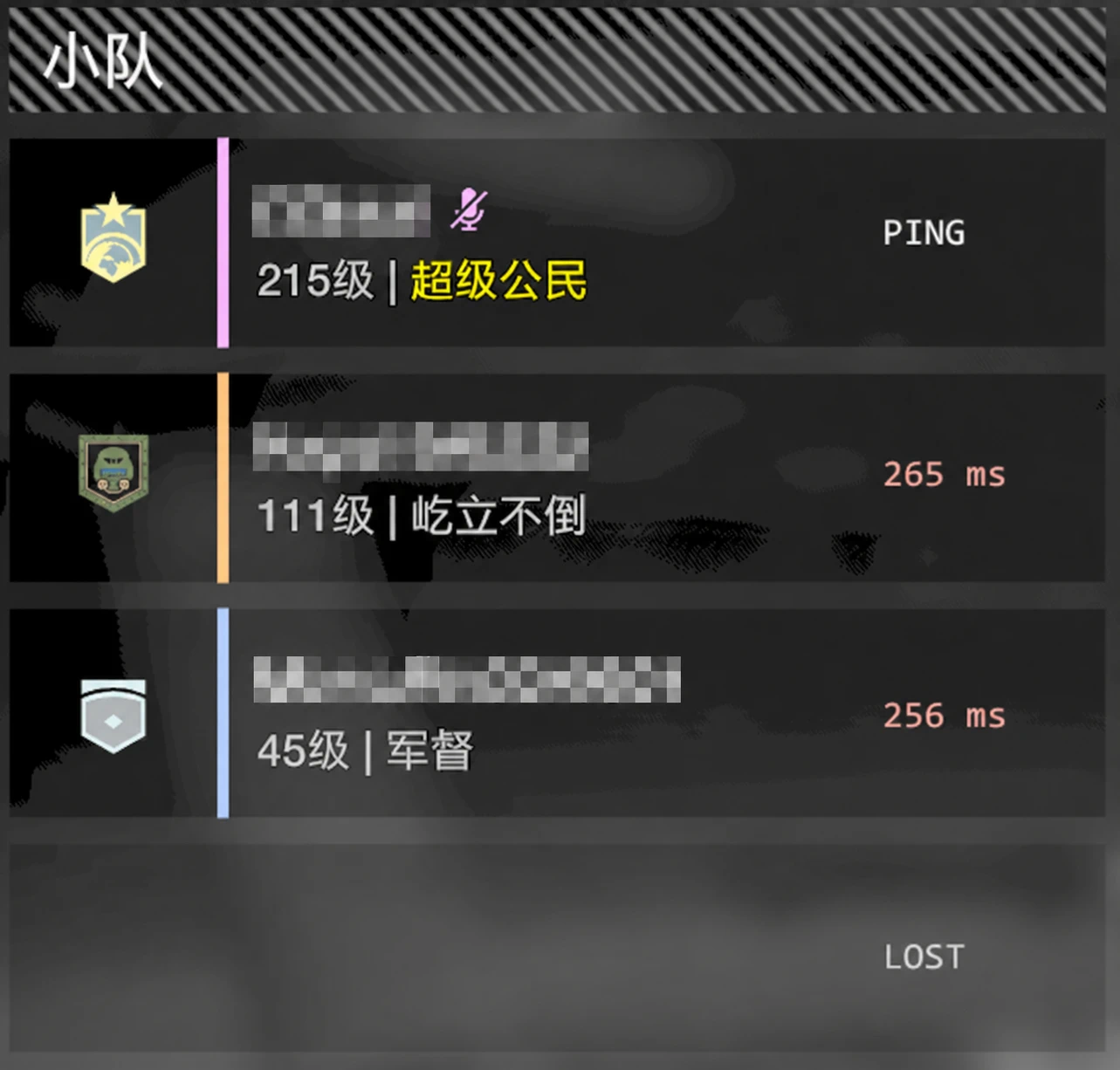
ESC Squad Ping直接在ESC小队面板中显示你与每位队友的实时延迟。无论你是主持还是加入,打开菜单即可快速检查连接——简洁、轻量且无侵入性。
 查看大图
ESC 小队延迟显示
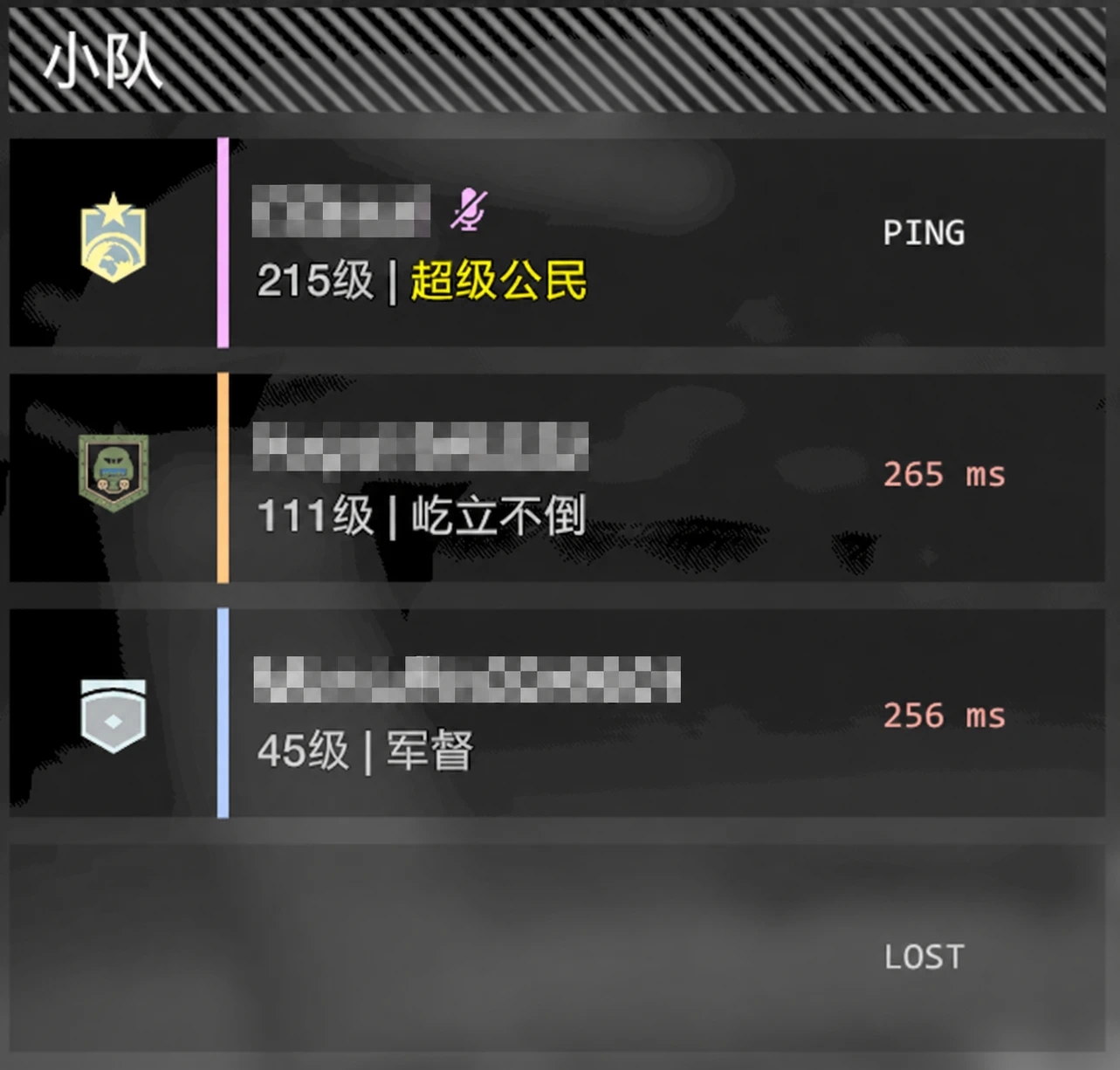
在《HELLDIVERS 2》的 ESC 菜单“小队”栏中,显示你与其他小队成员之间的实时网络延迟。
打开 ESC 菜单的“游戏”页面后,模组会在每个小队位置右侧显示对应状态:
- 自己:LOCAL
- 已确认玩家对应关系:82 ms
- 延迟有效,但玩家对应关系尚未确认:? 82 ms
- 玩家存在,但延迟或映射仍在建立:CONNECTING
- 空位:LOST
无论你是房主还是加入其他玩家的房间,测量结果始终来自你自己的游戏客户端。
v0.5.3 更新
现在作为房主时,会在队友入队或离队时自动在聊天框广播队内延迟情况,可在 Mod Options Menu 中开启或关闭。 新增设置菜单与按键绑定菜单的中英文自动适配。 手动广播无默认按键,请在 MODS 按键菜单中自行绑定;清空绑定后禁用手动广播,不影响自动播报。
When hosting, squad latency is now automatically broadcast in chat when teammates join or leave. This feature can be enabled or disabled in Mod Options Menu. Added automatic English and Chinese localization for the settings and keybinding menus. Manual broadcast has no default key. Assign one in the MODS bindings menu; clearing the binding disables manual broadcast without affecting automatic announcements.
延迟信息可靠性
游戏提供的网络连接列表顺序不一定与 ESC 菜单中的玩家排列顺序相同。直接按照连接顺序显示延迟,可能会将某名玩家的延迟显示到另一名玩家旁边。
本模组会通过小队 roster 的 unit ID 与网络对象所有权建立:
小队位置 → 网络 peer → RTT
只有连续验证得到一致结果后,才会将延迟作为准确数值显示。
状态含义:
- 82 ms:延迟数值与该位置玩家的对应关系已经确认。
- ? 82 ms:延迟来自真实的队内连接,但当前无法确认它是否属于该行玩家。
- CONNECTING:该位置存在玩家,但尚未取得有效延迟或可靠映射。
- LOST:该位置没有玩家。
准备界面有时可以立即提供完整映射,有时只能提供队内连接和 RTT。遇到后一种情况时,模组会使用 ? 标记近似对应关系,而不会将未经确认的结果伪装成准确映射。
映射缓存
可靠映射建立后,模组会在当前游戏进程中暂存小队成员与位置的对应关系。
只要队伍成员没有发生变化:
- 再次打开 ESC 菜单时可以立即复用映射。
- 完成任务并返回准备界面后可以继续准确显示。
- 不需要每次打开菜单都重新等待映射确认。
玩家加入、退出或连接集合发生变化时,旧缓存会立即失效并重新验证,避免将延迟分配给错误的玩家。
功能特点
- 支持房主和客机。
- 支持单人、飞船内小队、准备界面及多人任务。
- 显示本机到最多三名队友的 RTT。
- 通过网络对象所有权匹配玩家位置,不依赖连接列表顺序。
- 对未确认的玩家对应关系使用 ? 明确标记。
- 缓存已经确认的映射,并在队伍成员变化后自动清除。
- 不修改玩家名称、等级或称号文本。
- 不依赖截图、像素或分辨率识别。
- 使用只读游戏状态判断当前界面和小队位置。
- 延迟每秒更新一次,关闭菜单后停止采样。
- 兼容不同分辨率,显示位置会随界面尺寸缩放。
前置要求
必须安装:
Bingus Shared Loader v15 或更新版本(API 1)
安装方法
- 安装并启用 Bingus Shared Loader。
- 使用 HD2 Arsenal 或 HD2MM 导入本模组 ZIP。
- 启用模组并执行 Purge / Deploy。
- 使用 Arsenal 默认优先级时,请将 Bingus Shared Loader 放在加载顺序最下方。
- 完整重启游戏。
技术说明
本模组通过游戏网络接口获取当前 peer,并使用 Network.ping() 测量本机到队友的 RTT。
为了避免连接列表顺序与小队栏顺序不同而导致延迟错配,模组会读取小队 roster 的 unit ID,并与各 peer 拥有的网络对象进行只读匹配。
界面识别和玩家映射均使用只读原生状态,不会修改游戏菜单、玩家数据或网络状态。
由于原生结构可能在游戏更新后发生变化,大型游戏更新后可能需要兼容性更新。
日志位置
%LOCALAPPDATA%\CowboyBingus\Helldivers2\Logs\EscSquadPing.log
报告问题时,请附上:
- 完整日志
- 游戏版本
- 模组版本
- 房主或客机状态
- 问题发生在飞船、准备界面还是任务内
- 当时显示的是准确延迟、?、CONNECTING 还是 LOST
ESC Squad Ping
Displays real-time network latency between you and the other squad members in the HELLDIVERS 2 ESC menu.
When the Game tab of the ESC menu is open, the mod displays a status beside each squad slot:
- Your own slot: LOCAL
- Confirmed player mapping: 82 ms
- Valid RTT with an unconfirmed player mapping: ? 82 ms
- Player present, but latency or mapping is still being established: CONNECTING
- Empty slot: LOST
Whether you are the host or a client, every measurement is taken from your own game client.
Latency Reliability
The order of the game’s network connection list does not necessarily match the player order shown in the ESC squad panel. Assigning latency values directly by connection order can display one player’s latency beside another player.
To prevent this, the mod establishes the following mapping:
Squad slot → Network peer → RTT
It uses the squad roster unit ID and network-object ownership to identify which peer belongs to each squad position. A mapping must be verified consistently before its latency is displayed as confirmed.
Status meanings:
- 82 ms: The RTT and the player shown on that row have been reliably matched.
- ? 82 ms: The RTT is a real measurement from a squad peer, but its association with that specific row has not yet been confirmed.
- CONNECTING: A player is present, but a valid RTT or reliable mapping is not yet available.
- LOST: The squad position is empty.
The preparation screen sometimes exposes a complete player mapping immediately, but in other cases it initially exposes only the active peers and their RTT values. In that situation, the mod marks unordered results with ? instead of presenting them as confirmed player-specific latency.
Mapping Cache
After a reliable mapping has been established, the mod caches the relationship between squad positions and peers for the current game process.
As long as the squad membership remains unchanged:
- Reopening the ESC menu can reuse the mapping immediately.
- Returning to the preparation screen after a mission can retain accurate placement.
- The mod does not need to repeat the full confirmation delay every time the menu is opened.
If a player joins, leaves, or the connection set changes, the cached mapping is immediately invalidated and verified again. This prevents old latency values from being assigned to the wrong player.
Features
- Works for both hosts and clients.
- Supports solo play, ship squads, preparation screens, and multiplayer missions.
- Displays RTT from the local client to up to three squadmates.
- Matches network peers to squad positions instead of trusting connection-list order.
- Clearly marks unconfirmed player associations with ?.
- Caches confirmed mappings and invalidates them when squad membership changes.
- Does not modify player names, levels, or title text.
- Does not use screenshots, pixel detection, or resolution-based recognition.
- Uses read-only native game state to identify the menu and squad positions.
- Updates latency once per second and stops sampling when the menu is closed.
- Scales its display position with the current UI resolution.
Requirements
Required dependency:
Bingus Shared Loader v15 or newer (API 1)
Installation
- Install and enable Bingus Shared Loader.
- Import this mod’s ZIP using HD2 Arsenal or HD2MM.
- Enable the mod and run Purge / Deploy.
- When using Arsenal’s default priority behavior, place Bingus Shared Loader at the bottom of the load order.
- Fully restart the game.
Technical Information
The mod obtains the current network peers through the game’s networking interface and uses Network.ping() to measure RTT from the local client to each squadmate.
To prevent mismatches between connection-list order and squad-panel order, the mod reads the squad roster unit IDs and matches them against the network objects owned by each peer.
Menu detection and player mapping use read-only native game state. The mod does not modify the game menu, player data, or network state.
Native game structures may change after a game update, so major updates may require a compatibility update.
Log Location
%LOCALAPPDATA%\CowboyBingus\Helldivers2\Logs\EscSquadPing.log
When reporting an issue, please include:
- The complete log
- Game version
- Mod version
- Whether you were the host or a client
- Whether the issue occurred on the ship, preparation screen, or during a mission
- Whether the affected slot displayed a confirmed RTT, ?, CONNECTING, or LOST
正在加载版本记录…
正在加载评论…
评论在新手盒子客户端中发表,这里同步展示。