超级M32A1
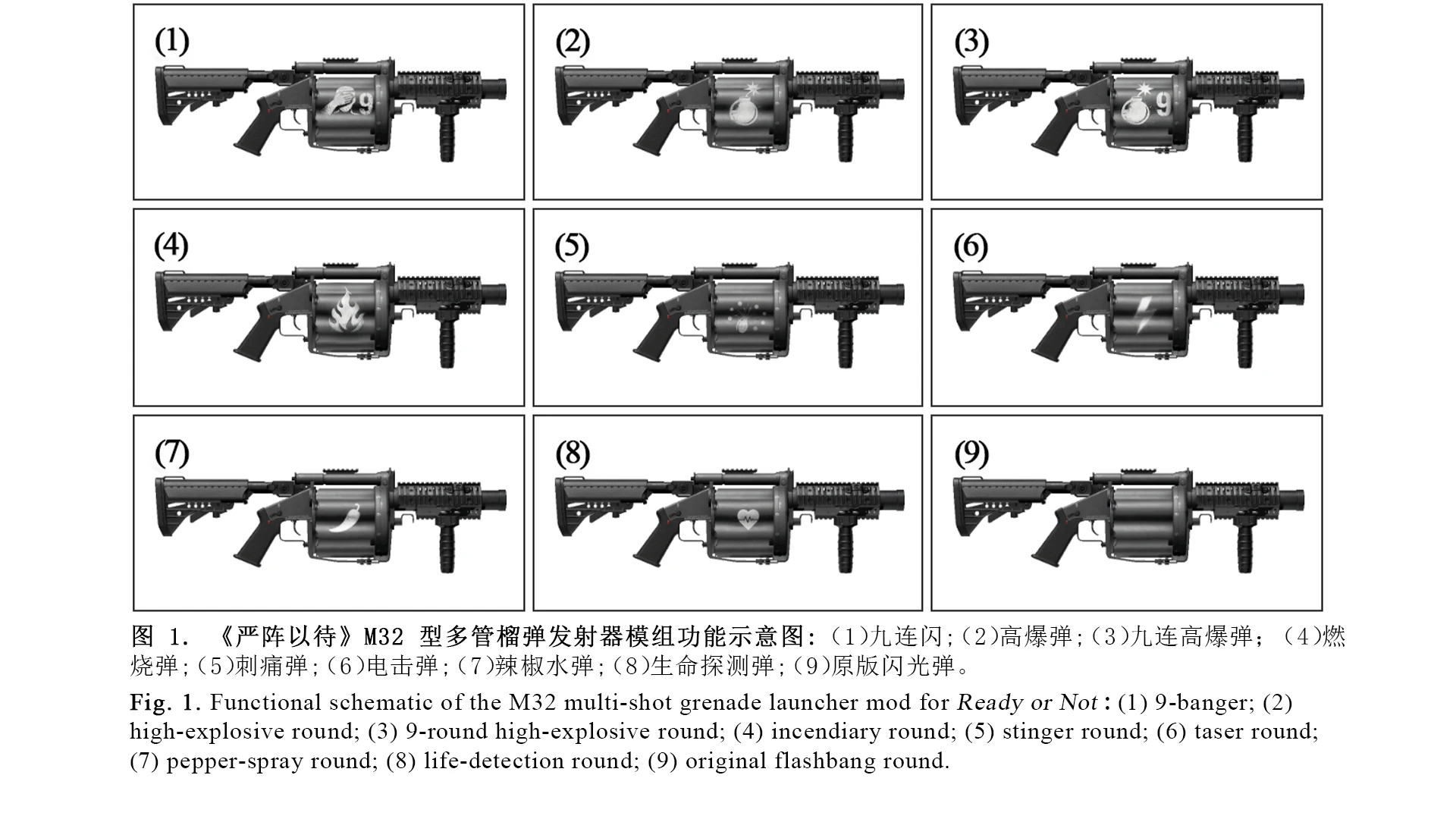
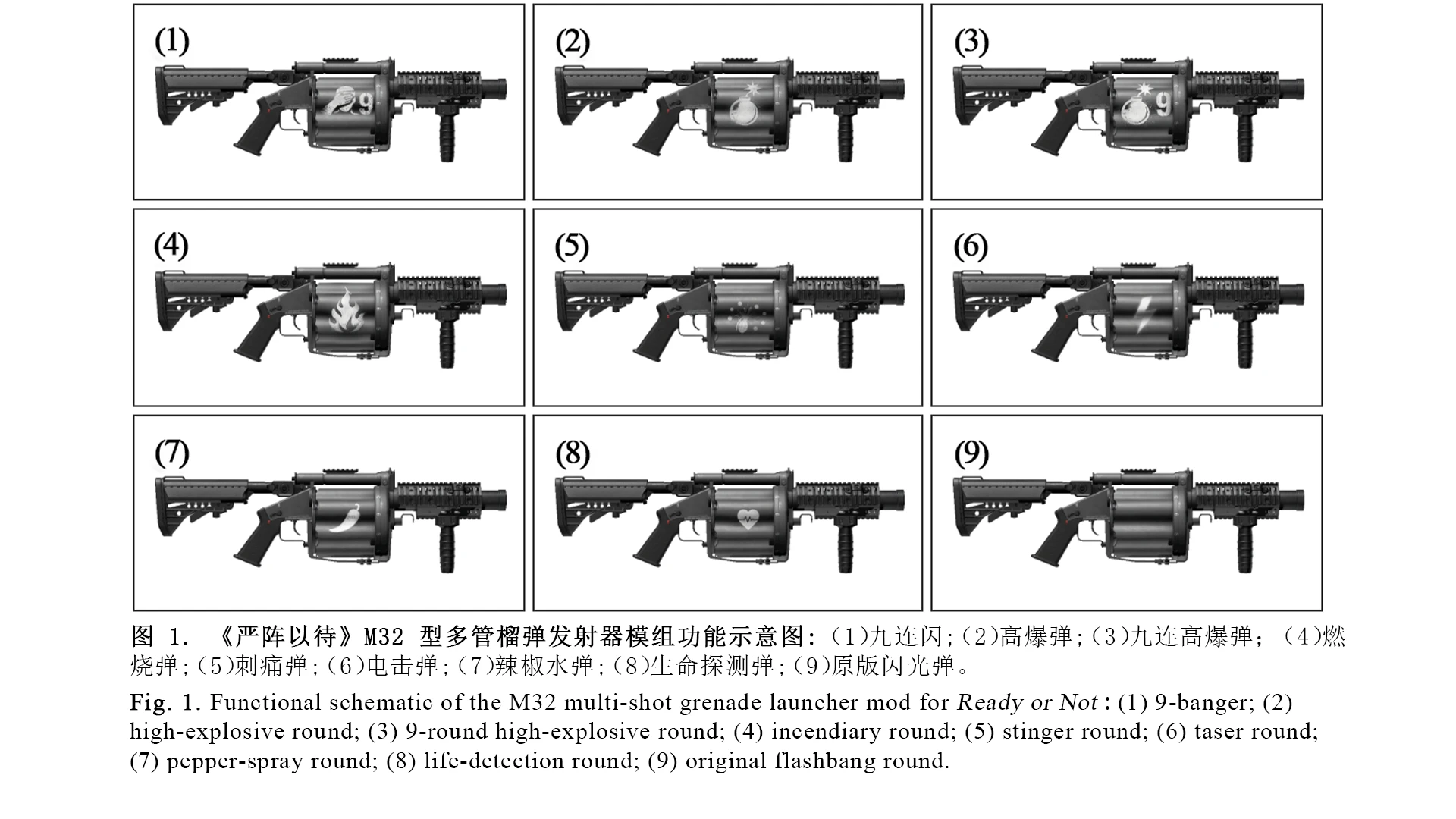
加强榴弹枪,包含8种效果, 具体看描述或者图片 --|-- Super M32A1 with 8 effect types. See the description or images for details.
 查看大图
配置方法请下翻 | For configuration instructions, please scroll down. For English instructions, please scroll down.
本mod为游戏增加了以下榴弹枪,可作为【主武器】或者【战术装备】:
[1] 九连闪,[2] 高爆,[3] 九连高爆,[4] 燃烧,[5] 刺痛,[6] 电击,[7] 辣椒水,[8] 生命探测。
注意:
[1] 生命探测半径为15m,可选文件有21m和50m版本 [2] 作为【战术装备】时,无法安装配件。 [3] 缩短开火间隔,弹容量提升至12
This mod adds the following grenade launchers to the game, usable as either a Primary Weapon or Long Tactical Equipment.
[1] 9-Banger, [2] High Explosive, [3] 9-Burst High Explosive, [4] Incendiary, [5] Stinger, [6] Taser, [7] Pepper Spray, [8] Life Detector.
Notes: [1] The Life Detector has a detection radius of 15 m. Optional files provide 21 m and 50 m versions. [2] When used as Tactical Equipment, attachments cannot be installed. [3] Reduced firing interval and increased magazine capacity to 12.
如果喜欢本mod,敬请在页面上方给我点击 Endorse,你们的喜爱是我的动力
If you enjoy this mod, please consider clicking Endorse. Your support means a lot and keeps me motivated.
配置 Config ( For English, please scroll down. ):
不配置也能用,需要改的时候才配置 【v1.0.1配置】 1. 首先在文件管理器地址栏输入:%LOCALAPPDATA%\ReadyOrNot\Saved\Config\Windows 2. 按下回车键 3. 找到文件 Engine.ini (如果你的文件管理器没有显示文件扩展名,那么你的文件应该是 Engine ) 4. 使用任意文本编辑软件打开3中的文件(记事本之类的都行) 5. 在文件中添加以下内容(不要复制横线,不要删除注释前面的分号): ————————————
[/Game/Mods/yz_M32A1/yz_M32A1_LD/BP_LifeDetectArea.BP_LifeDetectArea_C]

; 探测半径,单位通常按 UE 厘米计算
; 1500 = 15m,2100 = 21m,5000 = 50m
DetectRadius=1500.0

; 扫描刷新间隔,单位:秒
; 数值越小刷新越快 ,一般不用调这个值
RefreshInterval=0.5

; 探测区域持续时间,单位:秒
LifeTime=8.0

; 第一人称手/枪前景屏蔽距离 推荐50不动
; 手和枪还被绿色盖住就调大,例如 100及以上
ForegroundDepthCutoff=50.0
————————————
[v1.0.1 Configuration] It can work without adding the following configuration. Only add or modify the following content when you need to change the configuration. 1. Open File Explorer and enter the following path in the address bar: ** %LOCALAPPDATA%\ReadyOrNot\Saved\Config\Windows** 2. Press Enter. 3. Find the file named Engine.ini. ** If your File Explorer does not show file extensions, the file may appear simply as Engine.** 4. Open the file from step 3 with any text editor, such as Notepad. 5. Add the following content to the file. ** Do not copy the separator line.** ————————————
[/Game/Mods/yz_M32A1/yz_M32A1_LD/BP_LifeDetectArea.BP_LifeDetectArea_C]

; Detection radius, usually measured in UE centimeters.
; 1500 = 15 m, 2100 = 21 m, 5000 = 50 m.
DetectRadius=1500.0

; Scan refresh interval, in seconds.
; Lower values update faster, Usually, this value does not need to be adjusted.
RefreshInterval=0.5

; Duration of the detection area, in seconds.
LifeTime=8.0

; Foreground masking distance for the first-person hands/weapon. Recommended: 50.
; Increase this value, such as 100 or higher, if the hands/weapon are still covered by the green overlay.
ForegroundDepthCutoff=50.0
————————————


正在加载版本记录…
正在加载评论…
评论在新手盒子客户端中发表,这里同步展示。