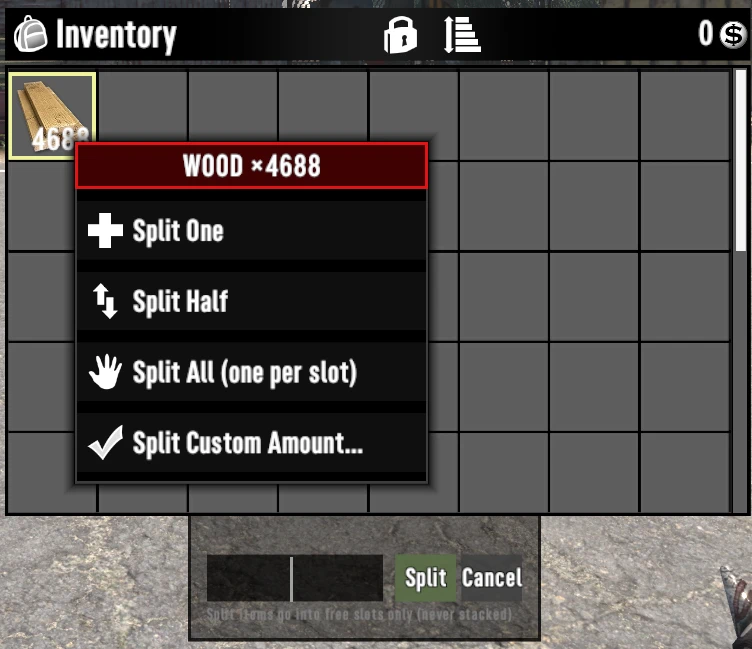
右键物品拆分菜单
Split item stacks with a right-click context menu — just like right-clicking files on your desktop. 右键物品堆即可拆分——就像在桌面右键文件一样自然。
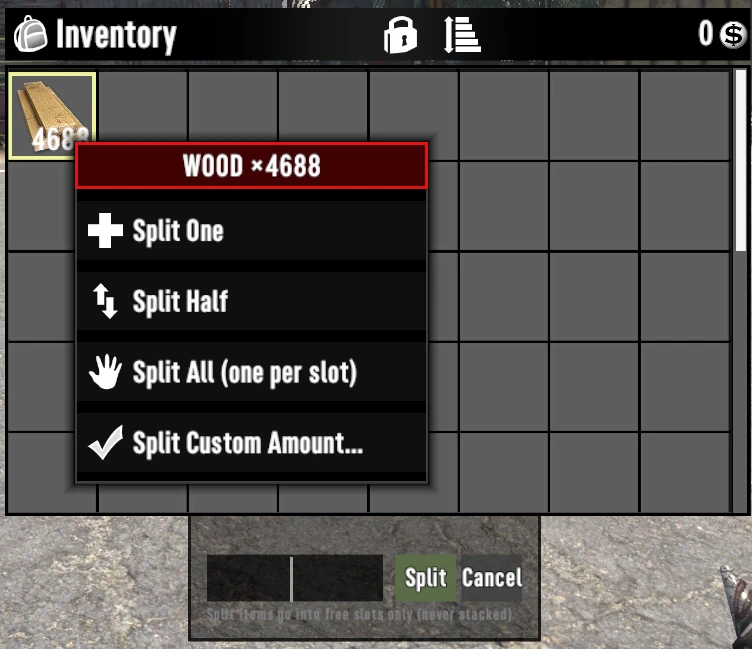 查看大图
Right-Click Item Split Menu — 右键拆分物品菜单
================================================
Split item stacks with a right-click context menu — just like right-clicking files on your desktop.
右键物品堆即可拆分——就像在桌面右键文件一样自然。
FEATURES / 功能
------------------------------------------------
• Right-click any stack (count ≥ 2) in your backpack / loot / vehicle storage to open the split menu
背包 / 战利品 / 载具储物中右键物品堆弹出拆分菜单
• Split One / Split Half / Split All (one item per slot, fills your inventory)
拆分一个 · 拆分一半 · 拆分全部(每格一个铺满背包)
• Split Custom Amount — hover the entry and a cascading input card opens automatically (like the "New ▸" submenu on Windows). Type a number, press Enter. No preset value.
拆分指定数量 —— 鼠标悬停即展开级联输入卡,输入数字回车即拆(无预设数字)
• Split items go into FREE slots only — they never stack onto existing piles (including the source slot)
拆分结果只进空格子,绝不与已有堆叠合并
• Leftover items return to the source slot automatically when the inventory is full
背包满时剩余物品自动退回源格
• Uses the vanilla popup menu system — looks and feels native, doesn't replace any vanilla UI
复用原版弹出菜单,观感与原生一致
COMPATIBILITY / 兼容性
------------------------------------------------
• Game version: V3.3 (works with 3.2-era builds as well)
• Requires 0_TFP_Harmony loader; EAC must be off
• No known conflicts with Quartz / BigMap / crafting mods (patches only XUiC_ItemStack(Slot).Update & XUiC_PopupMenu)
INSTALLATION / 安装
------------------------------------------------
1. Extract the folder into .../7 Days To Die/Mods/
2. Launch the game with EAC disabled
3. Open your backpack, right-click a stack
CREDITS
------------------------------------------------
Author: XvAIPeribroep
Pairing it with this mod of mine makes for a more comfortable experience. [url=https://www.nexusmods.com/7daystodie/mods/12837]PullCraft at 7 Days to Die Nexus - Mods and community[/url]
正在加载版本记录…
正在加载评论…
评论在新手盒子客户端中发表,这里同步展示。