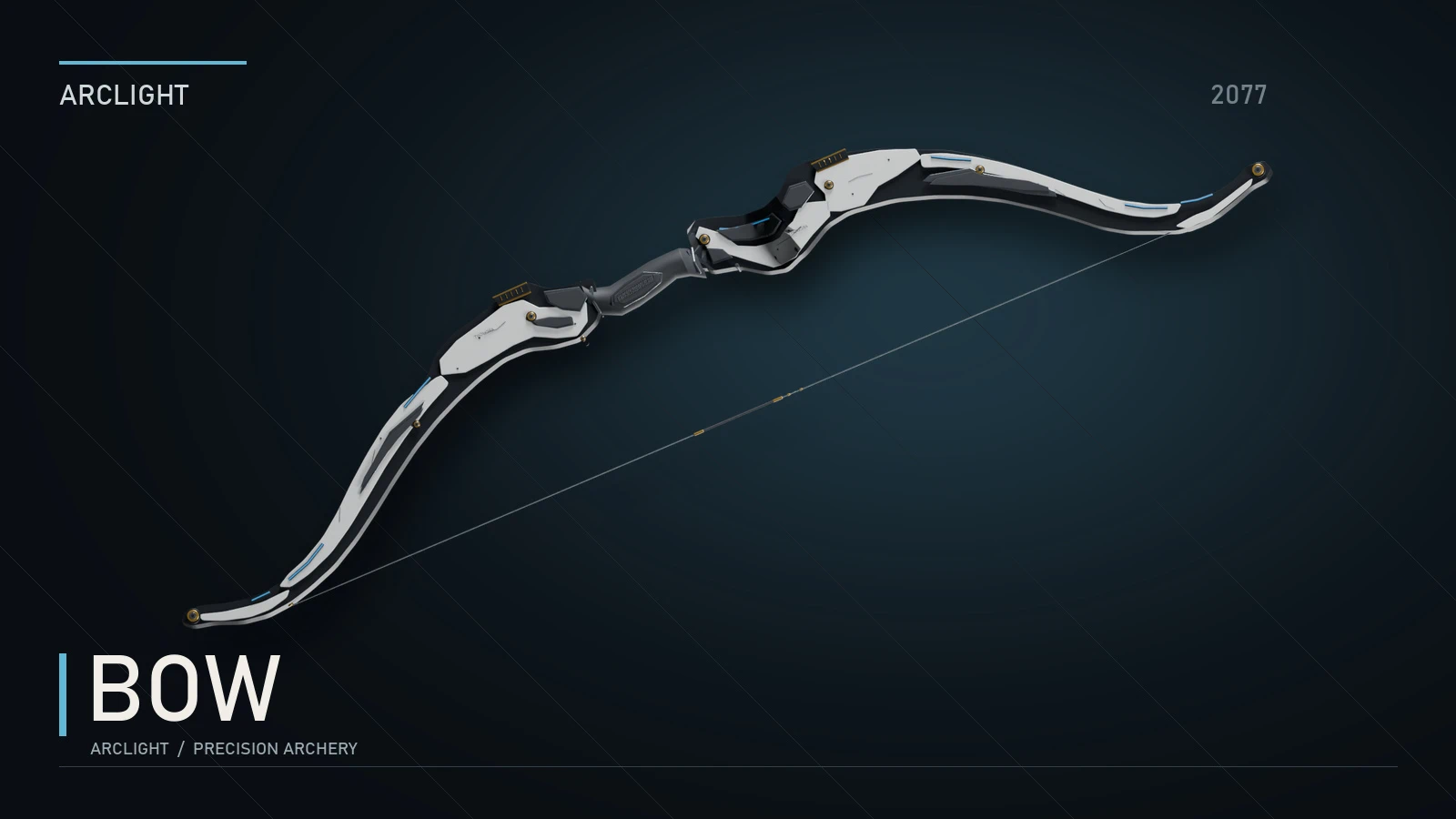
Bow - Arclight
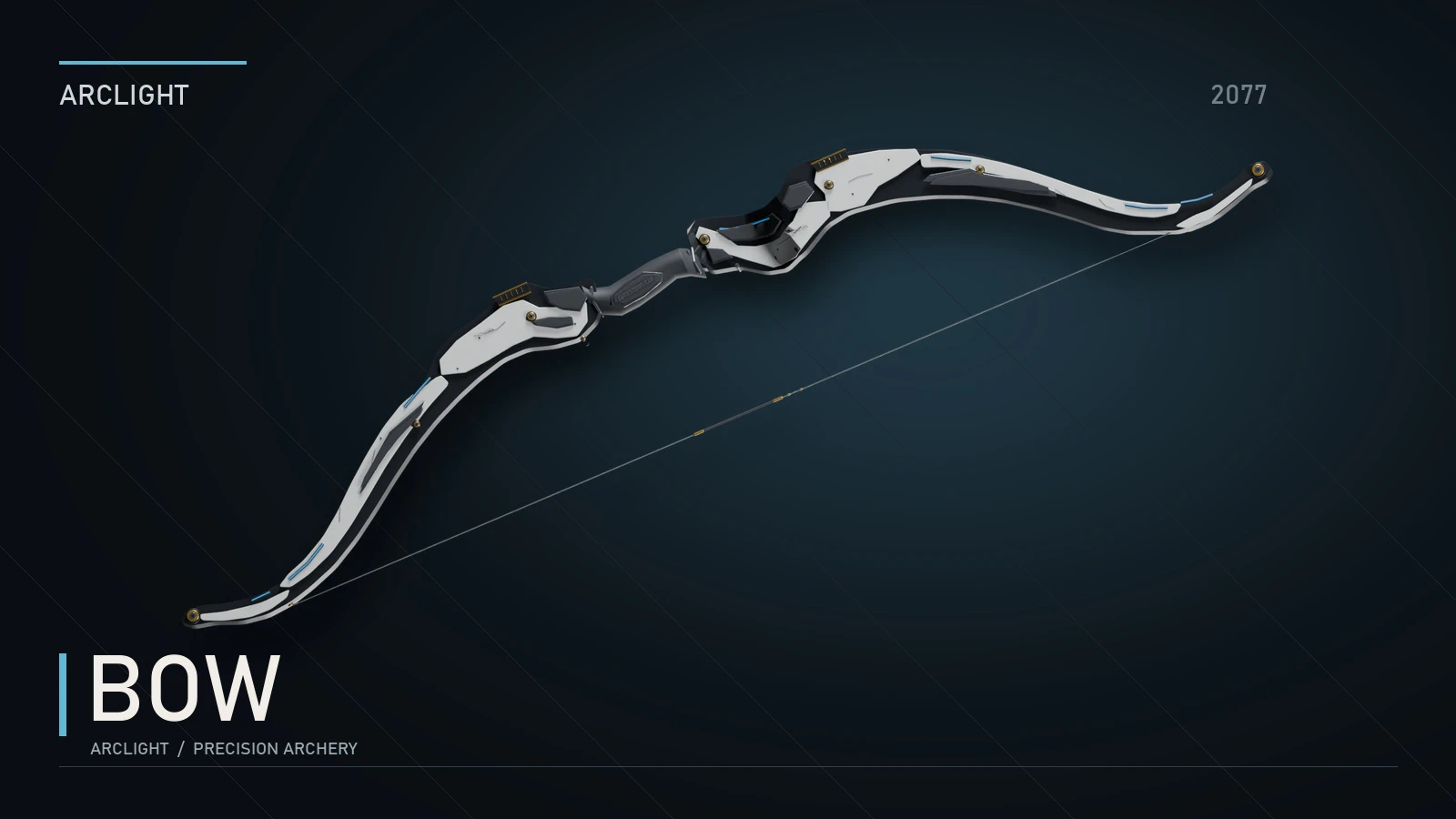
A custom Arclight bow for Night City, with animated draw and release, physical arrows, dedicated first-person handling, inventory and Photo Mode presentation. Buy the bow and arrows through the updated Arclight Virtual Atelier, or use CET commands.
 查看大图
[center][color=#7FDCEB][b]A R C L I G H T[/b][/color]
[size=2]ADVANCED WEAPON SYSTEMS[/size]
[size=6][b]BOW[/b][/size]
[/center]
[size=4][color=#EAC56A][b]NEW / MUCH BETTER BOW SOUND EFFECTS[/b][/color][/size]
The bow now has much better sound effects, kindly provided by [url=https://www.nexusmods.com/profile/Solitariuss][b]Solitariuss[/b][/url]. Huge thanks for generously sending them to me!
[center][img]https://staticdelivery.nexusmods.com/mods/3333/images/34402/34402-1790725372-583620507.gif[/img]
[size=2][i]Draw, release and nock animation[/i][/size][/center]
[size=4][color=#EAC56A][b]01 / HOW THE BOW WORKS[/b][/color][/size]
[list]
[][b]CLICK FIRE[/b] for a quick shot[/]
[][b]HOLD FIRE, THEN RELEASE[/b] to shoot with more power[/]
[][b]HOLD AIM[/b] to draw and hold; press fire to release a ready arrow[/]
[][b]PRESS RELOAD[/b] to cancel the draw[/]
[/list][center][/center]
[size=4][color=#EAC56A][b]ARROW MODES[/b][/color][/size]
Switch between eight arrow modes with the configurable cycle key or individual shortcuts. Default quickslot keys are listed below; you can change them in Mod Settings. The HUD shows your selected mode. Special arrows now have color-coded tail plates.
[center][img]https://staticdelivery.nexusmods.com/mods/3333/images/34402/34402-1790725541-1055827774.png[/img]
[size=2][i]The new arrow models and colored tail plates.[/i][/size][/center]
[b]ARROW MODEL RENDERS / EXPAND TO VIEW[/b]
[spoiler]
[center][img]https://staticdelivery.nexusmods.com/mods/3333/images/34402/34402-1790725537-75319236.png[/img]
[size=2][i]New arrow geometry[/i][/size][/center]
[center][img]https://staticdelivery.nexusmods.com/mods/3333/images/34402/34402-1790725539-2032492128.png[/img]
[size=2][i]Poison[/i][/size][/center]
[center][img]https://staticdelivery.nexusmods.com/mods/3333/images/34402/34402-1790725541-1404524998.png[/img]
[size=2][i]Recon[/i][/size][/center]
[center][img]https://staticdelivery.nexusmods.com/mods/3333/images/34402/34402-1790725539-1529802466.png[/img]
[size=2][i]Decoy[/i][/size][/center]
[center][img]https://staticdelivery.nexusmods.com/mods/3333/images/34402/34402-1790725541-294082683.png[/img]
[size=2][i]Electric[/i][/size][/center]
[center][img]https://staticdelivery.nexusmods.com/mods/3333/images/34402/34402-1790725541-963708754.png[/img]
[size=2][i]Explosive[/i][/size][/center]
[center][img]https://staticdelivery.nexusmods.com/mods/3333/images/34402/34402-1790725542-1268290778.png[/img]
[size=2][i]Non-lethal[/i][/size][/center]
[center][img]https://staticdelivery.nexusmods.com/mods/3333/images/34402/34402-1790725537-1352868414.png[/img]
[size=2][i]Smoke[/i][/size][/center]
[/spoiler]
[b]STANDARD[/b] (quickslot key = Shift+1) — physical arrows for precision shots.
[b]NON-LETHAL[/b] (quickslot key = Shift+2) — a non-lethal option for your loadout.
[b]EXPLOSIVE[/b] (quickslot key = Shift+3) — detonate at impact for area damage.
[center][img]https://staticdelivery.nexusmods.com/mods/3333/images/34402/34402-1790725424-1942757168.gif[/img]
[size=2][i]Explosive arrow[/i][/size][/center]
[b]ELECTRIC[/b] (quickslot key = Shift+4) — deliver an electrical area effect.
[center][img]https://staticdelivery.nexusmods.com/mods/3333/images/34402/34402-1790725425-723065336.gif[/img]
[size=2][i]Electric arrow[/i][/size][/center]
[b]POISON[/b] (quickslot key = Shift+5) — poison your target.
[b]RECON[/b] (quickslot key = Shift+6) — reveal nearby enemies.
[center][img]https://staticdelivery.nexusmods.com/mods/3333/images/34402/34402-1790725426-1083030148.gif[/img]
[size=2][i]Recon arrow[/i][/size][/center]
[b]DECOY[/b] (quickslot key = Shift+7) — draw enemy attention to the impact area.
[b]SMOKE[/b] (quickslot key = Shift+8) — deploy a smoke cloud.
[center][img]https://staticdelivery.nexusmods.com/mods/3333/images/34402/34402-1790725425-501533280.gif[/img]
[size=2][i]Smoke arrow[/i][/size][/center]
[size=4][color=#EAC56A][b]TRAILS[/b][/color][/size]
Visible arrow trails make each shot easy to follow. Give each arrow mode its own RGB trail color, or use one custom color across all modes.
[center][img]https://staticdelivery.nexusmods.com/mods/3333/images/34402/34402-1790725423-2105175796.gif[/img]
[size=2][i]Arrow tracers[/i][/size][/center]
[size=4][color=#EAC56A][b]MELEE ATTACK[/b][/color][/size]
[center][img]https://staticdelivery.nexusmods.com/mods/3333/images/34402/34402-1790725427-491846787.gif[/img]
[/center]
[b]MORE COMBAT FOOTAGE[/b]
[spoiler]
[center][img]https://staticdelivery.nexusmods.com/mods/3333/images/34402/34402-1790725423-713965331.gif[/img]
[/center]
[center][img]https://staticdelivery.nexusmods.com/mods/3333/images/34402/34402-1790725427-1101920559.gif[/img]
[/center]
[/spoiler]
[size=4][color=#EAC56A][b]ARROW RECOVERY[/b][/color][/size]
Walk up to an arrow and collect it. Explosive, Electric and Smoke arrows are consumed by their effects.
[size=4][color=#EAC56A][b]MOD SETTINGS[/b][/color][/size]
Open [b]Settings > Mod Settings > Arclight Bow[/b] to configure damage and headshot multipliers, draw and nock timing, the arrow-cycle key, individual mode shortcuts and modifiers, enabled modes, per-mode damage and RGB trail colors. Applicable modes also include effect radius or duration controls.
[size=4][color=#EAC56A][b]02 / THE WEAPON[/b][/color][/size]
A custom Arclight bow with its own 3D model, animated limbs and string, and a dedicated arrow model
[list]
[][b]DEDICATED HANDLING[/b] — refined first-person hand poses[/]
[][b]ANIMATED SHOT CYCLE[/b] — draw, hold, release and nock transitions[/]
[][b]PRESENTATION[/b] — inventory and Photo Mode support[/]
[][b]CUSTOM AUDIO[/b] — draw, release, nock and impact sounds through Audioware[/]
[/list]
[size=4][color=#EAC56A][b]03 / GET THE BOW[/b][/color][/size]
Install the updated [url=https://www.nexusmods.com/cyberpunk2077/mods/33818]Arclight Virtual Atelier[/url] alongside the weapon, then open Virtual Atelier on V's apartment computer and select [b]ARCLIGHT - Advanced Weapon Systems[/b]. The store offers the bow and its arrows when this weapon is installed.
[b]Prefer the console?[/b] With Cyber Engine Tweaks installed, use:
[code]Game.AddToInventory("Items.ArclightBow", 1)
Game.AddToInventory("Ammo.ArclightArrow", 100)[/code]
[size=4][color=#EAC56A][b]04 / INSTALLATION[/b][/color][/size]
[b]Core frameworks:[/b] RED4ext, redscript, ArchiveXL, TweakXL, Codeware, Cyber Engine Tweaks, Mod Settings and Audioware.
[list]
[][b]Requirements:[/b] install the frameworks listed in this page's Requirements section, including their own dependencies.[/]
[][b]Vortex:[/b] download the Arclight Bow file, install it, enable it and deploy your mods.[/]
[][b]Manual:[/b] extract the downloaded archive into your main Cyberpunk 2077 folder, merging the included folders.[/]
[]Restart the game after installation.[/]
[/list]
[b]Choose one installation route:[/b] use this standalone weapon or the updated seven-weapon [url=https://www.nexusmods.com/cyberpunk2077/mods/33543]Arclight bundle[/url] containing it. Do not install overlapping copies of the same weapon. The [url=https://www.nexusmods.com/cyberpunk2077/mods/33818]Arclight Virtual Atelier[/url] is a separate, optional store download and is not included in the bundle. Frameworks are not bundled; no REDmod deployment is required.
[size=4][color=#EAC56A][b]05 / FEEDBACK[/b][/color][/size]
If something behaves unexpectedly, leave a report in Posts or Bugs with your game version, mod version, installed requirements and the steps that trigger it. A short gameplay clip helps.
Have an idea for another Arclight weapon? Tell me what you want to do in combat and which weapon should make it possible.
[b]Sound effects:[/b] Special thanks to [url=https://www.nexusmods.com/profile/Solitariuss]Solitariuss[/url], who kindly provided the improved bow sounds.
[b]Credits:[/b] model, animation and integration by ThatModKiddie / Arclight. Studio artwork rendered from the model in Blender. Audio source and processing credits are included in [i]r6/audioware/ArclightBow/CREDITS.txt[/i].
[center][color=#7FDCEB][b]EXPLORE ARCLIGHT[/b][/color]
[url=https://www.nexusmods.com/cyberpunk2077/mods/33543]ARSENAL[/url] | [url=https://www.nexusmods.com/cyberpunk2077/mods/33819]DEADEYE[/url] | [url=https://www.nexusmods.com/cyberpunk2077/mods/33646]MINIGUN[/url] | [url=https://www.nexusmods.com/cyberpunk2077/mods/33818]ATELIER[/url]
[size=2]Custom weapons by ThatModKiddie[/size][/center]


正在加载版本记录…
正在加载评论…
评论在新手盒子客户端中发表,这里同步展示。