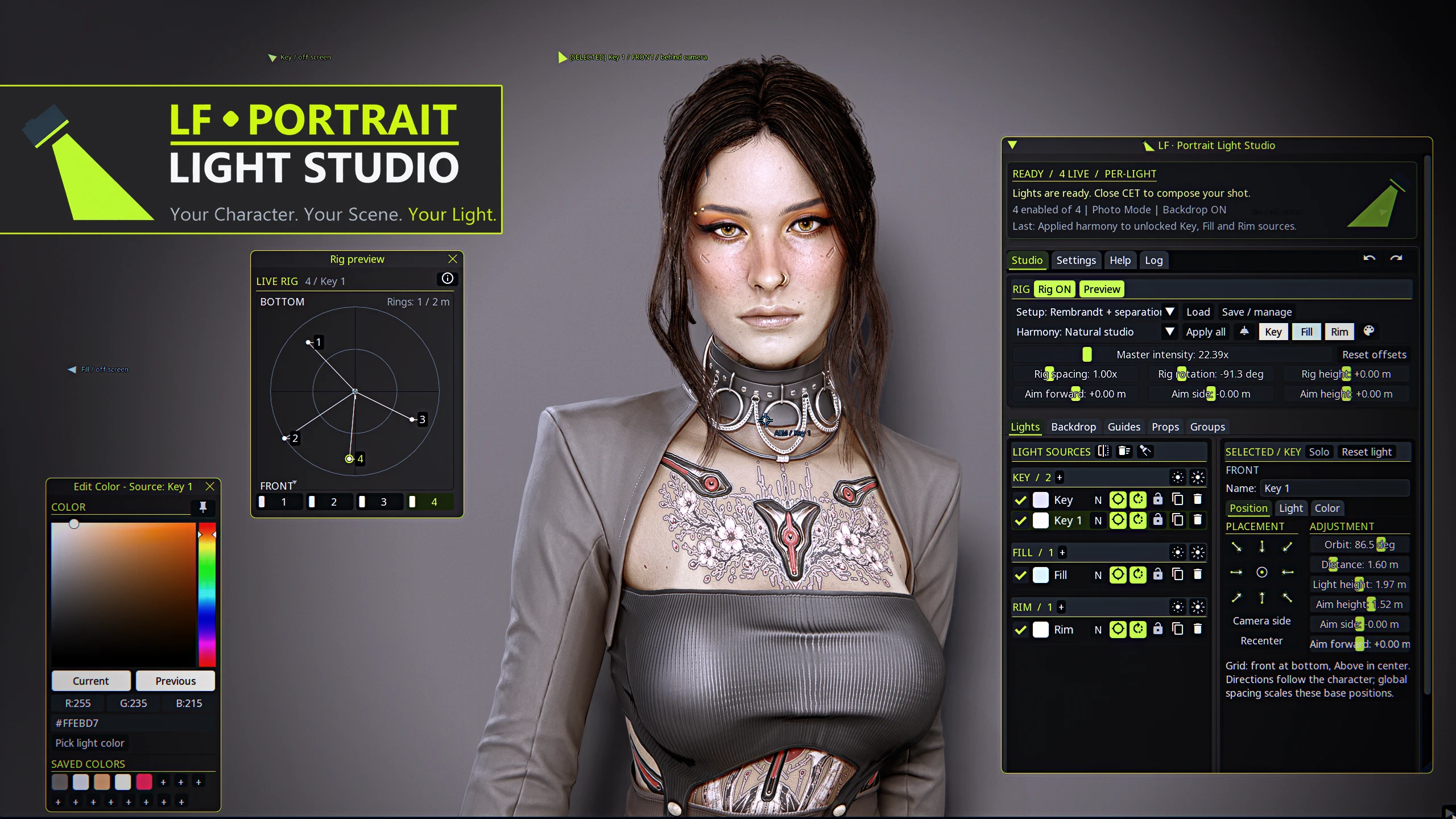
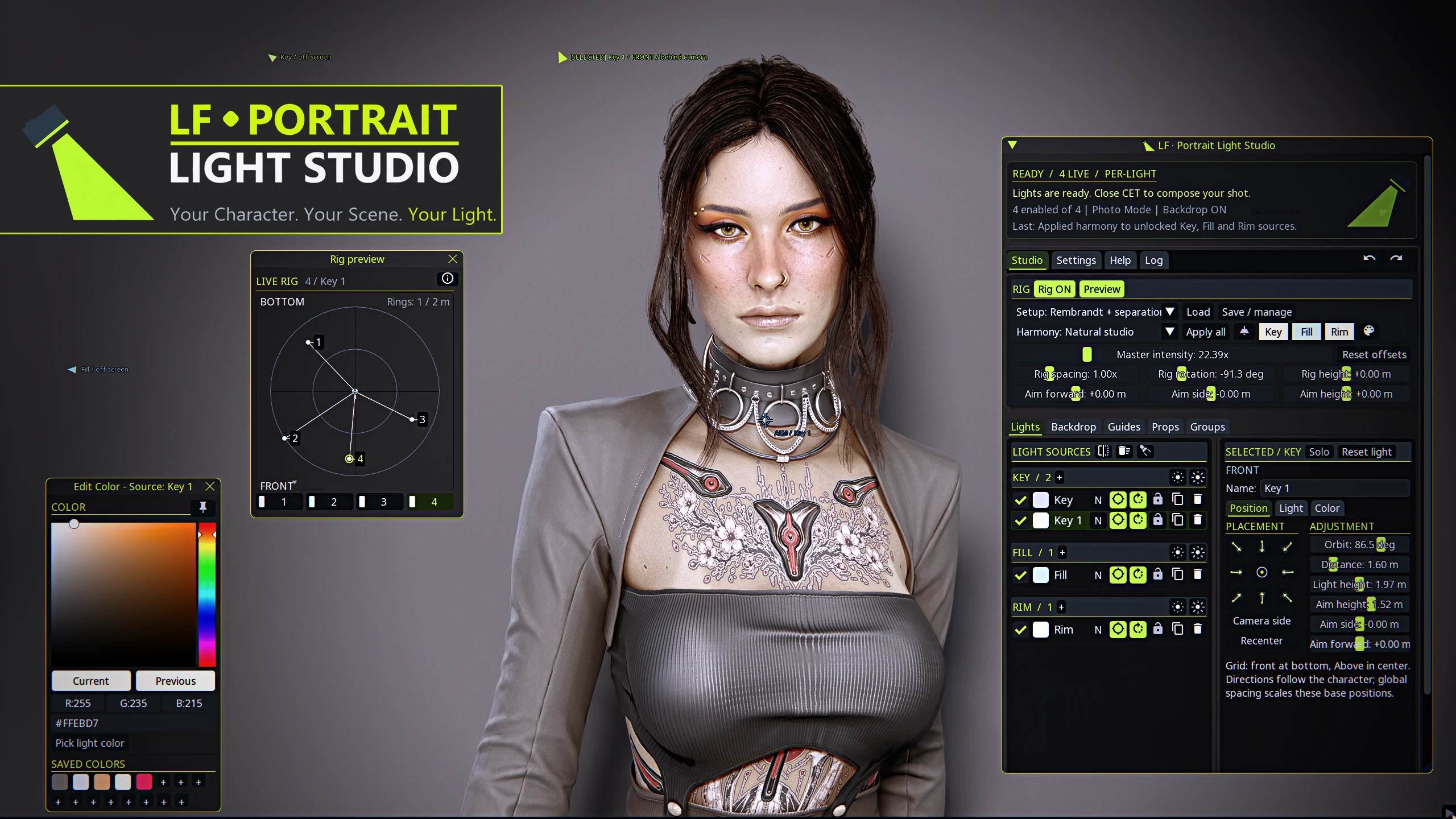
LF Portrait Light Studio - PT RT and Raster
Shape the light around your character, from a soft studio portrait to a neon close-up or a dramatic hero shot. LF Portrait Light Studio brings studio lighting, coordinated colors, backdrops, composition guides and placeable props together in one CET window. Fast, easy and adjustable. Your Character. Your Scene. Your Light. Take a shot.
 查看大图
[center][img width=503]https://staticdelivery.nexusmods.com/mods/3333/images/34361/34361-1790467369-469528925.png[/img] [/center]
[line]
[center]Shape the light around your character, from a soft studio portrait to a neon close-up or a dramatic hero shot.[/center]
[center][b][b][color=#CAFD00]LF Portrait Light Studio[/color][/b] brings lighting setups, coordinated colors, backdrops, composition guides and placeable props together in one CET window.[/b][/center]
[center][img width=247]https://staticdelivery.nexusmods.com/mods/3333/images/34361/34361-1790482996-1650383038.png[/img] [img width=145]https://staticdelivery.nexusmods.com/mods/3333/images/34361/34361-1790483019-489464833.png[/img]
[/center]
[center][b][color=#CAFD00]Easy, fast and adjustable. [/color][/b][/center]
[center]Start with a preset, adjust it for your pose, and save a setup you can return to.
Keep it simple with one light, or build a scene with up to [b]12 individually controlled sources[/b].
Defaulted to [b]PT[/b] light sources but can be switched to [b]Raster[/b] lights in the settings.[/center]
[line]
[center][/center]
[left][img]https://staticdelivery.nexusmods.com/mods/3333/images/34361/34361-1790473918-1709406506.png[/img][/left]
[list]
[][b]29 setup presets[/b] across Studio, Cinematic, Hero Shots and Basics. Explore clamshell beauty lighting, sculpted side light, colored rims, silhouettes and dramatic light from below.[/]
[][b]29 color harmonies[/b] across five collections, from natural skin tones to bold neon and darker moods. Apply a full harmony or color Key, Fill and Rim separately.[/]
[][b]One color or paired colors per category.[/b] Alternate primary and secondary colors within each category, and edit both in your own harmonies.[/]
[][b]Individual light controls.[/b] Adjust position, aim, intensity, reach, cone angles and shadow softness. Enable, duplicate, solo or lock sources, and organize them into groups.[/]
[][b]Global rig controls.[/b] Move the setup together with spacing, rotation, height and shared aim adjustments. Master intensity gives you one place to balance brightness for the scene.[/]
[][b]Live placement preview.[/b] See source positions and aim points in a bottom-view diagram. Click a numbered swatch to select a light. Distance rings show horizontal radius.[/]
[/list]
[center][img width=356]https://staticdelivery.nexusmods.com/mods/3333/images/34361/34361-1790494840-1932763851.png[/img] [img width=443]https://staticdelivery.nexusmods.com/mods/3333/images/34361/34361-1790483062-878114162.png[/img] [/center]
[line]
[left][img]https://staticdelivery.nexusmods.com/mods/3333/images/34361/34361-1790474019-1560404016.png[/img][/left]
[list]
[][b]Studio backdrops[/b] with color, finish and scale controls, plus image backgrounds and an adjustable Native Frame (wip) without leaving the photomode. [/]
[][b]Composition guides[/b] with adjustable color, opacity, thickness and mirrored patterns.[/]
[][b]Placeable props[/b] including seating and small objects for staged portraits. Spawn at the character's position and facing, then move, rotate, duplicate or hide them. Up to eight placed props.[/]
[][b]Preset manager[/b] with current-rig and saved-setup previews. Save a new lighting setup, rename it, update it or load it later.[/]
[][b]Undo and Redo[/b] for supported studio edits, including lights, applied colors, groups, props, backdrops, guides and appearance.[/]
[][b]Make the studio yours[/b] with theme colors, window transparency, a startup preset and optional session recovery. Searchable in-game Help section that explains the controls.[/]
[/list][line]
[left][img]https://staticdelivery.nexusmods.com/mods/3333/images/34361/34361-1790474156-1800470142.png[/img][/left]
[list=1]
[]Enter [b]Photo Mode[/b] and open CET.[/]
[]Start with [b]Clamshell studio[/b], the default setup, or choose a Setup and click [b]Load[/b]. Turn [b]Rig ON[/b].[/]
[]Begin at the default [b]6x Master intensity[/b] and adjust for your scene exposure. If you are not using path tracing, choose [b]Standard / non-PT compatible[/b] lighting in Settings.[/]
[]Adjust the Rig global controllers for general placement then move to manual per light source adjustments if needed.
Want to change the colors without changing the light placemen? Choose a Harmony, then click [b]Apply all[/b] for a fast color switch.[/]
[]Use [b]Preview[/b] window and/or the light sources' guides on screen to see their placement. Lights by default follow your character placement and rotation, toggleable off and on per light source.[/]
[]Add a backdrop, guides or props if needed. Save your lighting setup, close CET and compose your shot. Hide composition guides before taking the final screenshot.[/]
[/list][line]
[left][img]https://staticdelivery.nexusmods.com/mods/3333/images/34361/34361-1790474237-1632670431.png[/img][/left]
[left][b][color=#CAFD00]Required:[/color][/b] [/left]
[list]
[][url=https://www.nexusmods.com/cyberpunk2077/mods/107]Cyber Engine Tweaks[/url], [url=https://www.nexusmods.com/cyberpunk2077/mods/2380]RED4ext[/url] and [url=https://www.nexusmods.com/cyberpunk2077/mods/7780]Codeware[/url].[/]
[/list][left][b][color=#CAFD00]Install:[/color][/b][/left]
[list]
[]Use vortex or manually extract the files to the main Cyberpunk 2077 folder.[/]
[/list][left][b][color=#CAFD00]Updating:[/color][/b][/left]
[list]
[]Use Vortex or manually overwrite the mod's files, keep your existing user JSON files to keep you custom presets and preferences.[/]
[/list][left][b][color=#CAFD00]Optional:[/color][/b][/left]
[list]
[][url=https://www.nexusmods.com/cyberpunk2077/mods/26589]Window Utils[/url] adds window snapping to a grid.[/]
[][url=https://www.nexusmods.com/cyberpunk2077/mods/18448]CET Window Manager[/url] allows you more control and organization over your CET mods.[/]
[][url=https://www.nexusmods.com/cyberpunk2077/mods/30005]Window Switcher[/url] part of that CET eco system that allows better control and organization of CET mods.[/]
[/list][line]
[left][img]https://staticdelivery.nexusmods.com/mods/3333/images/34361/34361-1790474368-905612763.png[/img][/left]
[list]
[][b]No light?[/b] Check that the [Rig ON], light sources enabled in the list, Solo/group isolation not toggled on, brightness and reach.
- The light sources defaulted to be PT lights, if you don't use PT change in the setting of the studio the light sources to Standard lighting.
- A wall or a game object may also obstruct a source, check the status and Log. Light sources do move inwards if they are spawned in walls but it is not 100% bullet proof. Use the on screen guides or the Rig Preview window to see where the light sources located.[/]
[][b]Setups and harmonies do different jobs.[/b] A setup defines the lights and placement. A harmony changes their colors. Mix them to build your own look.[/]
[][b]Setup Previews are guides.[/b] The live diagram shows placement, not rendered lighting or height. Setup illustrations are Blender renders at a fixed 15x global light intensity, the current in-game default is 6x. Exposure, scene lighting, rendering mode, materials and pose all affect the result.[/]
[][b]Props are positioned objects.[/b] Choose sitting or hand poses and spawn a prop, props do not attach to hands, they spawn at your main character location so adjust their position manually. Small objects may need to be raised above the floor or moved out of the character. Props clear when Photo Mode ends or the mod reloads.[/]
[][b]Saved setups store lighting.[/b] They do not include props, backdrops, guides or camera position. Optional session recovery is separate and does not restore props or the camera niether.[/]
[][b]Custom Library changes are permanent.[/b] Undo/Redo covers studio edits, not custom presets \ color harmony saving, overwriting or deleting those and they are gone. Save a new setup when you want to keep the original.[/]
[][b]Need a hand?[/b] Hover a control for its tooltip or search the Help tab or post your question here.
When reporting an issue, include the mod version, rendering mode, setup or prop name, and relevant Log message. [/]
[][b]Preview Shots[/b] All the shot here by me where taken with[b][i] NO DLSS 5[/i][/b]. They achieved with the following [b]Edge LUT, UltraPlus, LF CameraVibe Suite, high res textures and of course Portrait Light Studio.[/b]
No post editing done on my preview images that created by me. Beside of course the text addition and combination in to one photo.
[/]
[/list][line]
[left][img]https://staticdelivery.nexusmods.com/mods/3333/images/34361/34361-1790474474-1571289374.png[/img][/left]
[left][/left]
[left]Created by [b][color=#CAFD00]LithiumFlower aka Amonlith[/color][/b]. [/left]
[center][left][/left]
[left]Big thanks for my dear friends for their continues support and help - [url=https://www.nexusmods.com/profile/amaralll]Amaralll[/url], [url=https://www.nexusmods.com/profile/Dusk]Dusk[/url], [url=https://www.nexusmods.com/profile/Z4RM]Z4RM[/url], [url=https://www.nexusmods.com/profile/Frauggy]Frauggy[/url][/left]
[left][/left]
[/center]
[left]Thanks to the creators and contributors of CET, RED4ext and Codeware for the tools that make this studio possible. [/left]
[left][/left]
[center][left]If you enjoy the studio, please consider endorsing it and sharing your portraits! I would love to see your creations.[/left]
[left]Explore [url=https://www.nexusmods.com/profile/LithiumFlower]my other mods[/url], including: [/left]
[/center]
[center][/center]
[center][url=https://www.nexusmods.com/cyberpunk2077/mods/33291][img width=501]https://staticdelivery.nexusmods.com/mods/3333/images/33291/33291-1788091720-147741310.png[/img][/url] [/center]
[center][/center]
[center][url=https://www.nexusmods.com/cyberpunk2077/mods/32066][img width=498]https://staticdelivery.nexusmods.com/mods/3333/images/32066/32066-1785488382-133029147.png[/img][/url]
[url=https://www.nexusmods.com/cyberpunk2077/mods/31274][img]https://i.ibb.co/JRwVntb2/LFCamera-Vibe-Logo-Small.png[/img][/url]
[url=https://www.nexusmods.com/cyberpunk2077/mods/29597][img width=524]https://staticdelivery.nexusmods.com/mods/3333/images/29597/29597-1778518776-2030489405.png[/img][/url]
And if would like to support me your support on [url=https://ko-fi.com/amonlith]Ko-fi[/url] helps me keep creating.
Thank you for reading and downloading. More to come as time allow it.
[url=https://ko-fi.com/amonlith][img width=329]https://storage.ko-fi.com/cdn/kofi1.png[/img][/url] [/center]
[center][i][color=#CAFD00]Your Character. Your Scene. Your Light.[/color][/i][/center]


![https://www.nexusmods.com/cyberpunk2077/mods/31274][img]https://i.ibb.co/JRwVntb2/LFCamera-Vibe-Logo-Small.png[/img][/url]](https://www.nexusmods.com/cyberpunk2077/mods/31274%5D%5Bimg%5Dhttps://i.ibb.co/JRwVntb2/LFCamera-Vibe-Logo-Small.png%5B/img%5D%5B/url%5D)


正在加载版本记录…
正在加载评论…
评论在新手盒子客户端中发表,这里同步展示。