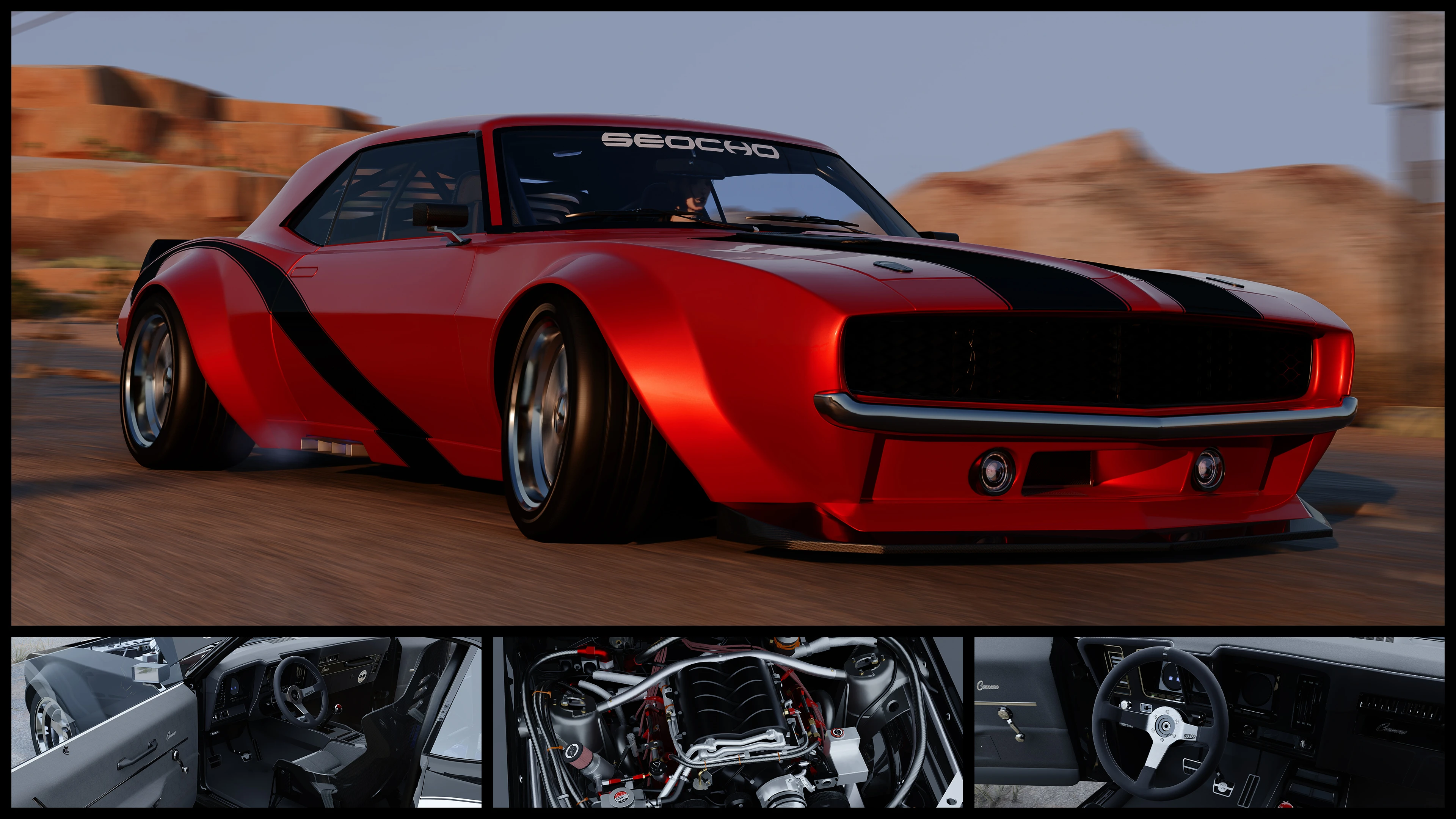
雪佛兰科迈罗SS JL4 - ArchiveXL
具有丰富的颜色定制功能,支持CrystalCoat™,并附带几个调校部件,所有这些都可以通过Vortex的fomod安装程序进行选择!
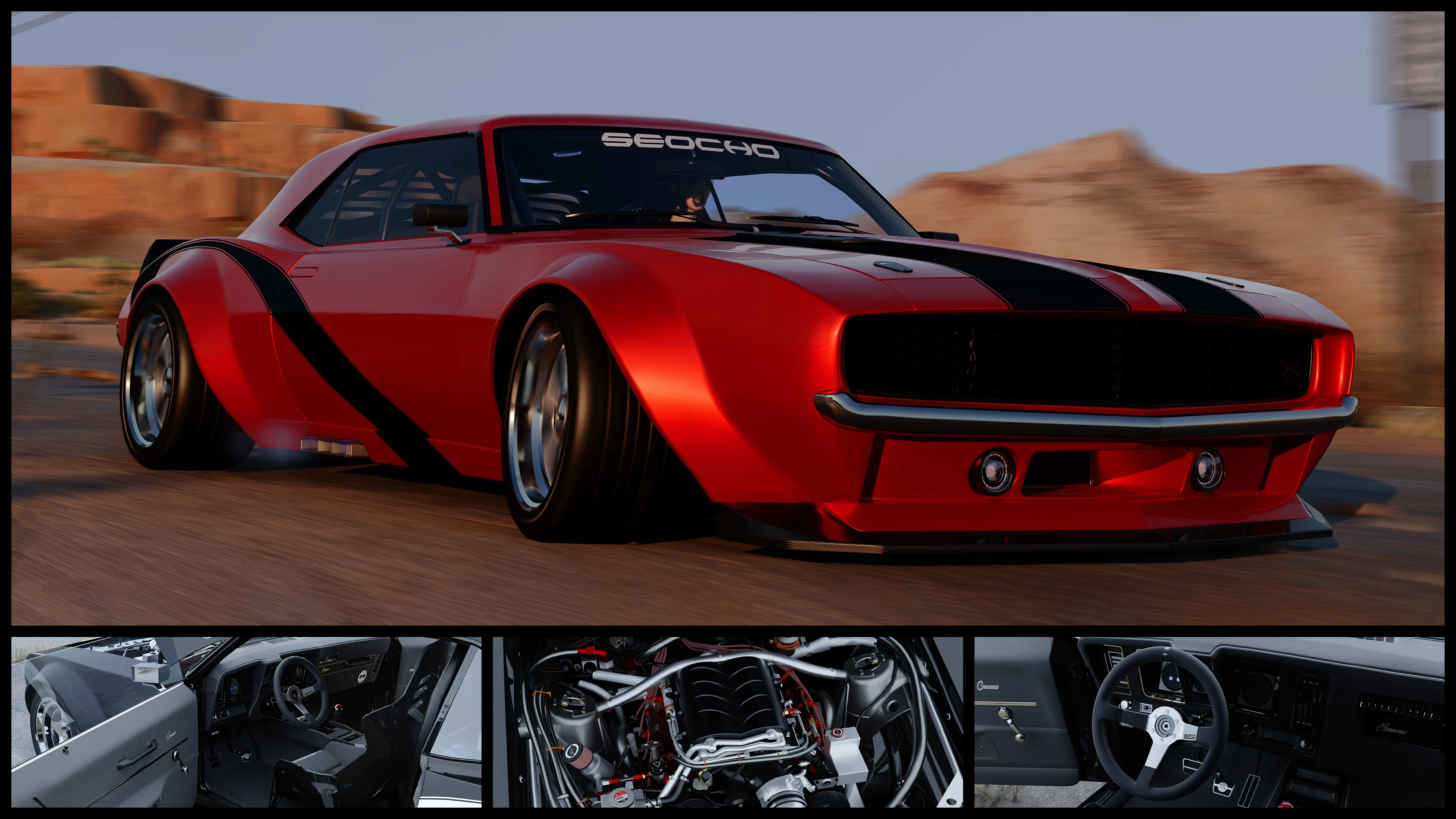 查看大图
颜色自定义:
你可以轻松更改车身、条纹、卡钳、轮毂、扰流板、引擎盖、后视镜、前铲、内饰缝线和车窗贴膜的颜色。此外,车身部件可以分配给 CrystalCoat™ 的主色或副色,以实现更进一步的个性化。这是通过编辑一个 [font=Courier New].xl[/font] 文件来实现的,该文件可以用记事本等任何文本编辑器打开。模组的 [font=Courier New].zip[/font] 文件中包含一份关于如何更改颜色的 PDF 教程、每种颜色下每个车身部件的预览图片,以及预设配色方案。
调校部件:
[list]
[]12 种颜色预设和 18 种颜色/材质可供自定义。请查看上方图库中的最后几张图片作为示例。[/]
[]降落伞[/]
[]翘头轮杆[/]
[]可拆卸部件:徽标、扩散器、大灯、前铲和扰流板[/]
[]10 种轮毂[/]
[/list]特性:
[list]
[]CrystalCoat™:默认情况下,主色影响车身和刹车卡钳,副色影响轮毂。可以通过上述颜色自定义进行更改。[/]
[]精细的内饰和引擎[/]
[]自定义仪表盘元素:功能性时钟、大灯、雾灯、引擎损坏和档位指示器、当前电台显示、动画均衡器[/]
[]功能性雾灯(按键盘上的 V 键激活)[/]
[]自定义底盘,带精细卡钳[/]
[]自定义操控和最高速度(200mph)[/]
[]烧毁外观,会移除玻璃和座椅软垫等可破坏元素[/]
[]非 RTX 阴影网格[/]
[]正确定位的特效,例如引擎烟雾和回火[/]
[]自定义扫描仪数据[/]
[][color=#ffff00]可伸缩大灯[/color](redscript 由 [url=https://www.nexusmods.com/cyberpunk2077/users/185259609]MisterChedda[/url] 编写!)[/]
[][url=https://www.nexusmods.com/cyberpunk2077/mods/14025]Nova Traffic[/url] 插件 - NPC 会驾驶该车在夜之城的日常交通中行驶[/]
[][url=https://www.nexusmods.com/cyberpunk2077/mods/4454]Virtual Car Dealer[/url] 插件 - 在 V 公寓的电脑上购买该车[/]
[][url=https://www.nexusmods.com/cyberpunk2077/mods/22810]Whip Wizard[/url] 插件 - 灯光组件会在该模组的菜单中正确标注[/]
[/list]已知问题:
[list]
[]从存档重新加载时,刹车灯有时不会立即亮起,刹车一次即可使其亮起。[/]
[]与 [url=https://www.nexusmods.com/cyberpunk2077/mods/11765]Enhanced Vehicle System[/url] 不兼容,因为 EVS 会将大灯和仪表盘指示灯的灯光颜色设置为相同颜色。[/]
[]在加载 V 位于车内的存档后,即使车灯是开启的,大灯也会收起。按住键盘上的 V 关闭车灯,然后再次按住该键重新开启。之后,大灯将会伸出。[/]
[/list]非常感谢 [url=https://next.nexusmods.com/profile/Barfunkle999]Barfunkle999[/url] 编写了关于如何实现 CrystalCoat™ 的[url=https://wiki.redmodding.org/cyberpunk-2077-modding/modding-guides/vehicles/new-crystalcoat-tm-guide]简易教程[/url],以及 [url=https://next.nexusmods.com/profile/Boe6/mods?gameId=3333]boe6[/url] 提供的[url=https://wiki.redmodding.org/cyberpunk-2077-modding/modding-guides/vehicles/boe6s-guide-new-car-from-a-to-z]维基文章[/url]和关于车辆模组制作的 [url=https://docs.google.com/document/d/1a5Xvviw_GQxcvbxEwc3GoboaNk0igxlhiyS7ux34sIs/edit?tab=t.0]pdf[/url]。
推荐模组:
[url=https://www.nexusmods.com/cyberpunk2077/mods/11134]No More Milky Glass[/url] 作者 [url=https://www.nexusmods.com/cyberpunk2077/users/32290030]Mark666DooM[/url] - 修复在间接/漫射 RTX 光照下奇怪的朦胧外观
[url=https://www.nexusmods.com/cyberpunk2077/mods/26318]Hot-Sampled Photomode Renders[/url] 作者 [url=https://www.nexusmods.com/cyberpunk2077/users/3462879]dragonzkiller[/url] - 用于超高分辨率截图的极其有用的模组
[url=https://www.nexusmods.com/cyberpunk2077/mods/20476]TPP Cam Toolkit[/url] 作者 [url=https://www.nexusmods.com/cyberpunk2077/users/20417594]Si13n7[/url] - 更改第三人称视角的相机位置
[url=https://www.nexusmods.com/cyberpunk2077/mods/25873]Factions Evolved[/url] 作者 [url=https://www.nexusmods.com/cyberpunk2077/users/3251739]ApoKrytia[/url] - 允许特定的夜之城帮派驾驶该车
[url=https://www.nexusmods.com/cyberpunk2077/mods/22315]Chevrolet Camaro SS[/url] 作者 [url=https://www.nexusmods.com/cyberpunk2077/users/177255294]Cornmilf[/url]
[url=https://www.nexusmods.com/cyberpunk2077/mods/25602]Chevrolet Ringbrothers Camaro Valkyrja[/url] 作者 [url=https://www.nexusmods.com/cyberpunk2077/users/103427023]MAXSA5[/url]
[color=#666666][s] [/s][/color]
[img]https://i.imgur.com/sg9j2K8.gif[/img]
[center][font=Courier New][color=#efefef]可伸缩大灯 ⤴[/color][/font][/center]
[img]https://staticdelivery.nexusmods.com/mods/3333/images/18919/18919-1768233500-95315440.gif[/img]
[center][font=Courier New][color=#efefef]颜色预设 ⤴[/color][/font][/center]
[color=#666666][s] [/s][/color]
安装:
如果你通过 Vortex 安装此模组,[url=https://nexus-mods.github.io/NexusMods.App/developers/misc/AboutFomod/]fomod[/url] 安装程序将引导你完成安装。它允许你选择调校部件(带预览图片)以及上述附加组件。该安装程序具有跳过调校部件安装并以默认车身部件配置安装车辆的选项。fomod 安装程序还可以将颜色自定义教程 PDF 添加到你的 Cyberpunk 2077 游戏文件夹中。这让你可以在 fomod 安装程序之外访问它。
如果你想手动安装该车,请使用专为 fomod 安装程序准备的 [font=Courier New].zip[/font]。下载并解压 [font=Courier New].zip[/font] 后,你会看到一个名为 [font=Courier New]fomod[/font] 的文件夹。双击打开它。其中的文件夹包含车辆和所有调校部件。它们的组织方式与你预期的[font=Courier New].zip[/font] 手动安装相同,并且还包含预览图片和 [font=Courier New].txt[/font] 文件,其中包含否则只能在 fomod 安装程序中获得的附加信息。预览文件以每个调校部件命名。名为 [font=Courier New]readme_manual_installation.txt[/font] 的文件包含有关如何安装车辆和调校部件的更多信息。[font=Courier New].xml[/font] 和 [font=Courier New].jpg[/font] 文件可以忽略,它们仅用于 fomod 安装程序。
我强烈建议使用模组管理器,因为这会让调校部件和附加组件的安装变得轻而易举。
[img]https://staticdelivery.nexusmods.com/mods/3333/images/18919/18919-1769274562-827574888.jpg[/img]
[color=#666666][s] [/s][/color]
[font=Courier New]CET 代码:[/font]
[font=Courier New][color=#b6b6b6]Game.GetVehicleSystem():EnablePlayerVehicle('Vehicle.yv_jl4_customisable', true, false)[/color][/font]


正在加载版本记录…
正在加载评论…
评论在新手盒子客户端中发表,这里同步展示。