作物生长进度
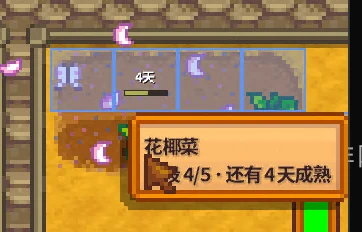
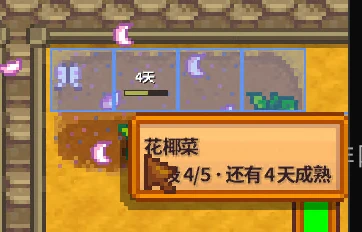
Show growth progress bars above nearby crops, with a hover panel for stage, days remaining, and watering status. Supports garden pots, greenhouse, Ginger Island, and standard modded crops. 在附近作物上方显示生长进度条,悬停查看阶段、剩余天数与浇水状态。
 查看大图
Crop Progress / 作物成熟进度
Show growth progress bars above nearby crops, with a hover panel for growth stage, days remaining, and watering status.
在附近作物上方显示生长进度条,鼠标悬停可查看生长阶段、剩余天数与浇水状态。
【Features / 功能】
• Floating progress bars above nearby crops, within a configurable radius (default 10 tiles; 0 = unlimited).
• F7 toggle for showing or hiding the bars; the setting is persisted.
• Hover panel with crop name, growth stage, days remaining, and a watering reminder.
• Works with crops in HoeDirt and garden pots, including the greenhouse, Ginger Island, and other locations while you are there.
• Supports vanilla crops and modded crops that use the standard Crop data.
• English and Simplified Chinese UI.
• Optional Generic Mod Config Menu integration.
【Why this mod? / 特点】
Unlike hover-only crop info mods, this draws compact bars directly above each crop and can limit them to a radius around the player.
与仅提供悬停信息的模组不同,本模组直接在作物上方绘制进度条,并可限制在玩家周围一定范围内显示。
【Requirements / 前置要求】
• Stardew Valley 1.6 or later.
• SMAPI 4.0 or later.
• Generic Mod Config Menu is optional (verified with 1.16.0). The mod works without it.
【Installation / 安装】
1. Install SMAPI.
2. Extract the downloaded zip so that the StardewCropProgress/ folder is directly under Mods/.
3. Launch the game through SMAPI.
【Configuration / 配置】
The mod creates a config.json in its mod folder. With Generic Mod Config Menu installed, these settings can be edited live in-game.
• ShowProgressBars — default true; show or h
• ToggleBarsKey — default F7; hotkey for toggling the bars.
• ShowHoverInfo — default true; show the hover panel.
• BarTextMode — Days, Percent, or Both; default Days.
• MaxDistanceTiles — default 10; bar display means unlimited.
• ShowMatureCrops — default false; also show mature crops with a gold full bar.
• ShowDeadCrops — default false; also show dead crops as a gray bar.
【Progress meaning / 进度口径】
• Growing crops show the current growth stage and estimated days remaining under normal growth.
• Regrowing crops show the regrow countdown after harvest.
• Ready crops use a gold full bar and a "ready" label.
• Dead crops use a gray bar.
• A blue stripe and a watering reminder indicate that the crop still needs water today.
【Debug / 调试】
Type cpp_debug in the SMAPI console to print the raw fields and calculated results for the crop under the cursor
(phaseDays, stage, watering state, days remaended for calibration and troubleshooting.
在 SMAPI 控制台输入 cpp_debug,可打印光标格作物的原始字段与计算结果,用于校准或反馈问题。
【Known limitations / 已知限制】
• Fruit trees, bushes, tea bushes, and giant crops are not shown.
• Only the current location of the local player is scanned.
• If a location has more than 2000 crops, only 2000 are cached/drawn. The retained order is unspecified; the hover
panel is unaffected.
• The hover panel follows the mouse cursor. In vanilla 1.6.15, the right stick does not move the cursor tile in the world, so gamepad aiming is not supported.
• Bars refresh about once per second, so thete by up to roughly one second. The hoverpanel queries live state.
• Speed-Gro and the Agriculturist profession are not predicted; actual maturity may be earlier than the displayed
estimate.
【Changelog / 更新日志】
0.1.0
• Initial release.
• Floating progress bars, hover panel, watering reminder, configurable radius, English/Chinese UI, optional GMCM integration, and cpp_debug command.
[img]https://staticdelivery.nexusmods.com/mods/1303/images/55692/55692-1794985019-2086003442.png[/img][img]https://staticdelivery.nexusmods.com/mods/1303/images/55692/55692-1794985024-1406587854.png[/img]

正在加载版本记录…
正在加载评论…
评论在新手盒子客户端中发表,这里同步展示。