EAC-bank
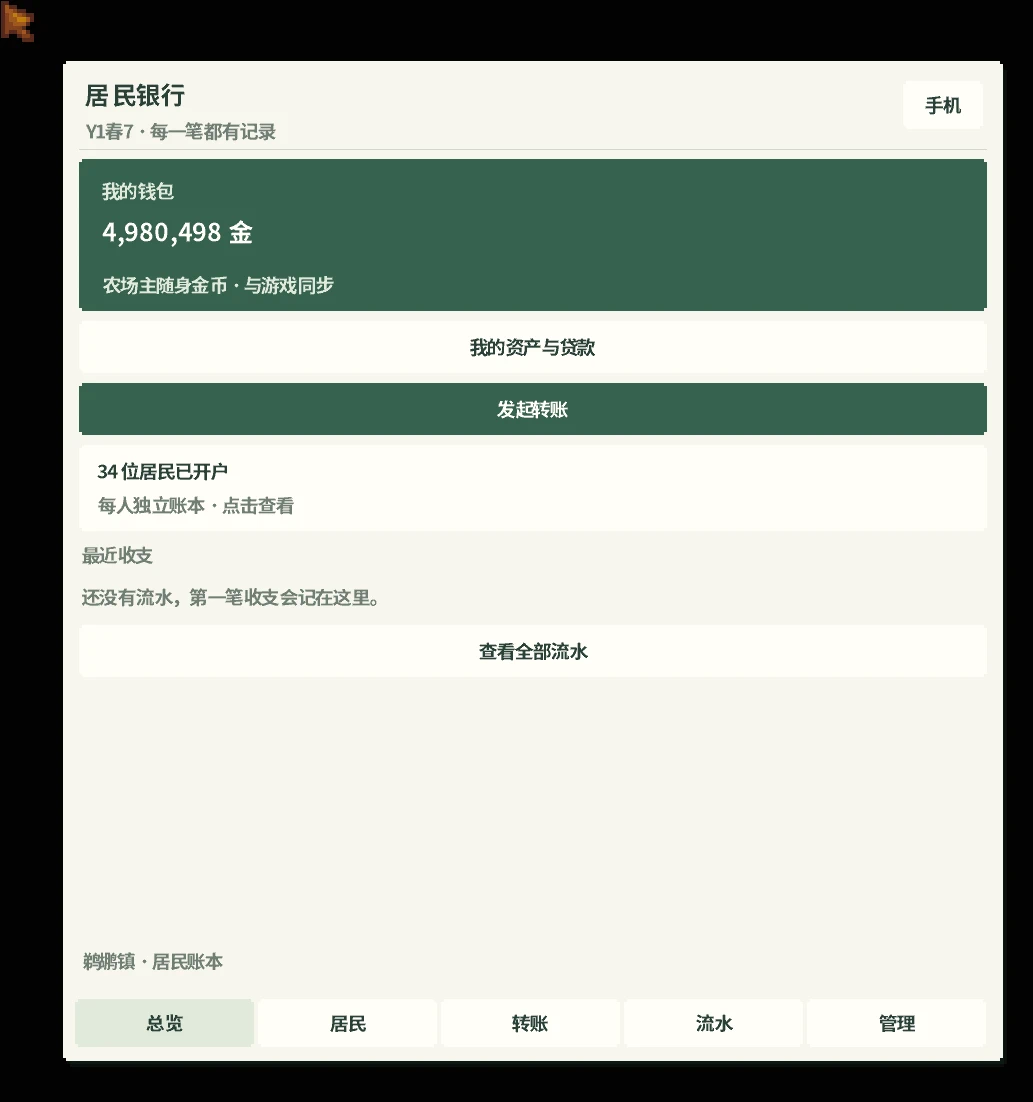
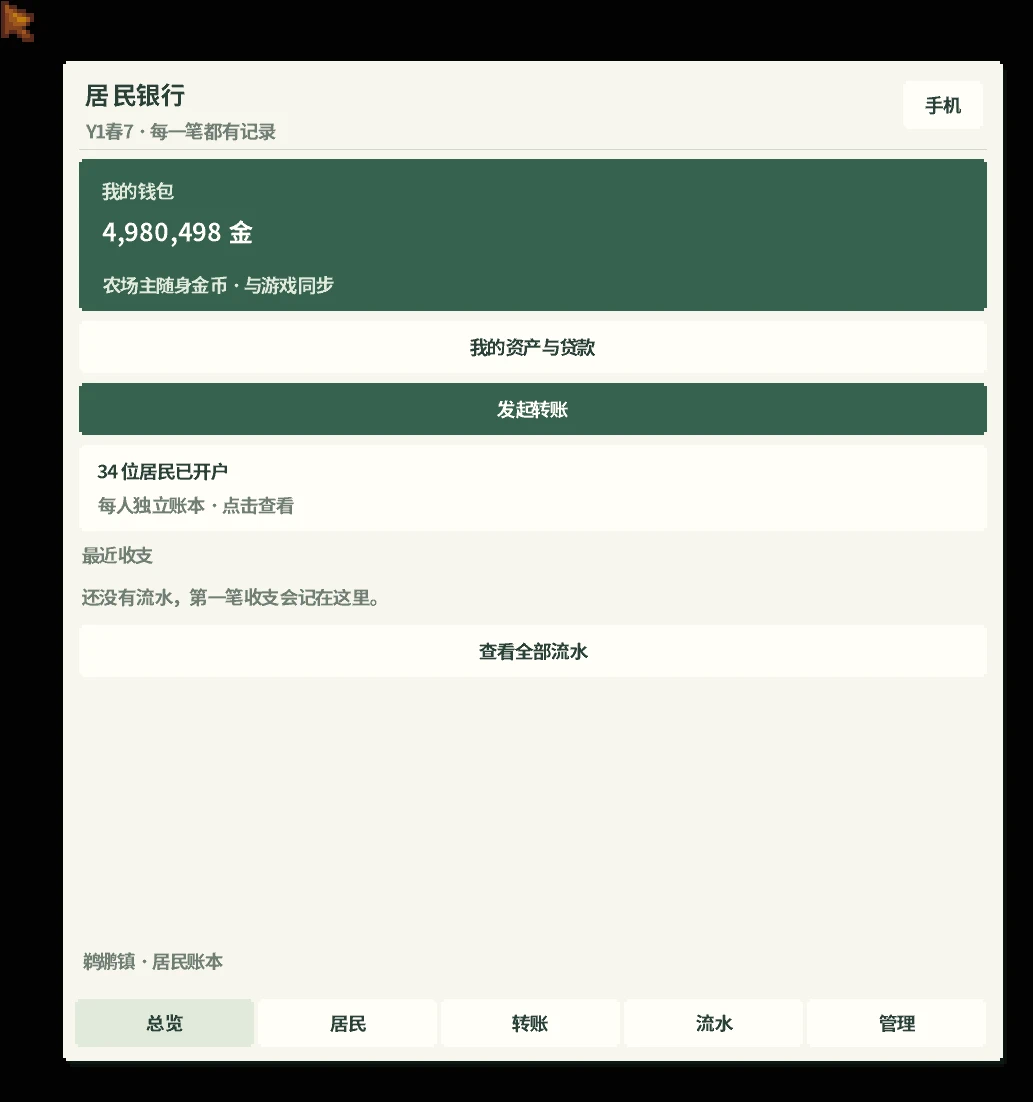
为EAC添加居民银行,使NPC能够拥有独立余额并管理日常收支。支持玩家与NPC之间的双向转账、移动转账卡、接受或拒绝转账、按角色筛选交易记录,以及资产和分期贷款管理。可记录银行交易
 查看大图
EAC 居民银行
让鹈鹕镇的居民拥有自己的钱包,也让金钱往来成为日常生活和聊天的一部分。
这是 EAC 的配套插件。NPC 拥有独立余额、收入和生活开支,玩家可以查看居民账户、进行转账、管理资产与贷款。已完成的收支可以写入相关 NPC 的浅层记忆,让他们知道自己收到了钱、支付了家用,或者正在还款。
主要功能
居民独立账户
每位已建账的 NPC 都有自己的余额。收入、生活开支与设定的家用按游戏天数结算,经济参数可在管理界面调整。
手机银行
从 EAC 手机的「应用 → 居民银行」进入,查看账户、余额、转账和流水。电脑端也可以使用默认快捷键 F8 打开。
双向手机转账
玩家可以在 NPC 私聊中发送转账,NPC 可以领取或拒绝。NPC 也可以通过聊天向玩家发起转账。手机中的横向卡片显示实际金额、备注和处理状态。
按人物查看流水
流水页支持选择全部人物、玩家自己或某个 NPC,也可以搜索名字。筛选后同时显示该人物相关的收入与支出。
资产、贷款与还款
支持登记固定资产估值、查看负债、申请贷款和还款。NPC 在日常生活费或家用不足时,可在符合条件及额度允许的情况下自动贷款,之后按规则计息与还款。自动贷款由程序处理,不需要额外调用 AI。
与 EAC 对话和记忆联动
银行可向 NPC 的对话提供其财务信息,并将已完成的收支写入相关人物的浅层记忆。日常结算使用本地规则;经济参数的 AI 校准是单独的功能。
如何开始
- 安装 SMAPI 和兼容的 EAC 本体。
- 下载本页面的已编译安装包,将其中的银行文件夹解压到游戏 Mods 目录。
- 通过 SMAPI 启动游戏并进入存档。
- 按 F9 打开银行,或在已购买并激活的 EAC 手机中进入「应用 → 居民银行」。
- 如需发送手机转账,打开对应 NPC 的私聊,点击「转账」,填写金额和备注。
默认仅为已启用 EAC AI 的 NPC 建立账户,可在配置中调整相关选项。
前置要求
- SMAPI 4.0.0 或以上。
- 支持手机应用与银行转账接口的 EAC。本版可搭配配套 EAC 2.7.2 使用。
- Generic Mod Config Menu 为可选依赖,不是必装。
使用说明
- 手机转账在收款方领取时才实际划转资金;拒绝或撤回不会划转。
- 转账时余额不足会被阻止,不会为了转账自动借贷。
- 资产估值属于手动登记,不代表自动识别或出售游戏中的房屋、土地等资产。
- 主要面向单人游戏及联机主机,客机操作不受支持。
- 更新时关闭游戏,覆盖原银行文件并保留配置,不要同时安装两份相同 Mod。
- 源码包需要先构建,不能直接作为安装包放进 Mods。
反馈问题时,请附上银行版本、EAC 版本、运行平台、复现步骤及 SMAPI 日志。
致谢
基于 Luckin 的居民银行扩展开发,感谢原作者提供的基础功能,也感谢参与测试和反馈的玩家。
EAC Resident Bank
Give the residents of Pelican Town their own wallets and make financial transactions a natural part of daily life and conversation.
This is a companion plugin for EAC. NPCs have independent balances, income, and living expenses; players can view resident accounts, make transfers, and manage assets and loans. Completed transactions can be recorded in the relevant NPC’s short-term memory, letting them know they’ve received money, paid household expenses, or are repaying a loan.
Key Features
• Independent Resident Accounts Every NPC with an established account has its own balance. Income, living expenses, and set household allowances are settled based on in-game days; economic parameters can be adjusted in the management interface.
• Mobile Banking Access via the EAC phone’s “Apps → Resident Bank” to view accounts, balances, transfers, and transaction history. On the desktop client, you can also open it using the default shortcut key F8.
• Two-Way Mobile Transfers Players can send transfers via private chat with NPCs, which the NPC can accept or decline. NPCs can also initiate transfers to players via chat. A horizontal card on the mobile screen displays the actual amount, notes, and processing status.
• View Transaction History by Character The transaction history page allows you to select all characters, the player themselves, or a specific NPC, or search by name. After filtering, both income and expenses related to that character are displayed simultaneously.
• Assets, Loans, and Repayments Supports recording fixed asset valuations, viewing liabilities, applying for loans, and making repayments. When an NPC’s daily living expenses or household budget are insufficient, they can automatically take out a loan—provided they meet the eligibility criteria and the credit limit allows it—with interest calculated and repayments made according to the rules. Automatic loans are handled by the program and do not require additional AI intervention.
• Integration with EAC Dialogue and Memory The bank can provide NPCs with their financial information during conversations and write completed income and expenses into the relevant characters’ short-term memory. Daily settlements follow local rules; AI calibration of economic parameters is a separate feature.
Getting Started
- Install SMAPI and a compatible EAC base game.
- Download the pre-compiled installation package from this page and extract the “Bank” folder into the game’s Mods directory.
- Launch the game via SMAPI and load a save file.
- Press F9 to open the bank, or go to “Apps → Resident Bank” in a purchased and activated EAC mobile app.
- To send a mobile transfer, open a private chat with the corresponding NPC, click “Transfer,” and enter the amount and note.
By default, accounts are created only for NPCs with EAC AI enabled; you can adjust the relevant options in the configuration.
Prerequisites
• SMAPI 4.0.0 or later. • EAC that supports mobile apps and bank transfer interfaces. This version is compatible with EAC 2.7.2. • Generic Mod Config Menu is an optional dependency and is not required.
Usage Instructions
• Funds are only actually transferred when the recipient claims the mobile transfer; rejecting or canceling the transfer will not result in a transfer. • Transfers will be blocked if the balance is insufficient; the system will not automatically borrow or lend funds to complete a transfer. • Asset valuation is manually recorded and does not imply automatic recognition or sale of in-game assets such as houses or land. • Primarily designed for single-player and online host modes; client-side operations are not supported. • Close the game before updating, overwrite the original bank files while preserving your configuration, and do not install two copies of the same mod simultaneously. • The source code package must be built first; it cannot be placed directly into the Mods folder as an installer.
When reporting issues, please include the bank version, EAC version, operating platform, steps to reproduce the issue, and SMAPI logs.
Acknowledgments
Developed based on Luckin’s Resident Bank expansion. Thanks to the original author for providing the core functionality, and to the players who participated in testing and provided feedback.
正在加载版本记录…
正在加载评论…
评论在新手盒子客户端中发表,这里同步展示。