游戏手柄插槽修复
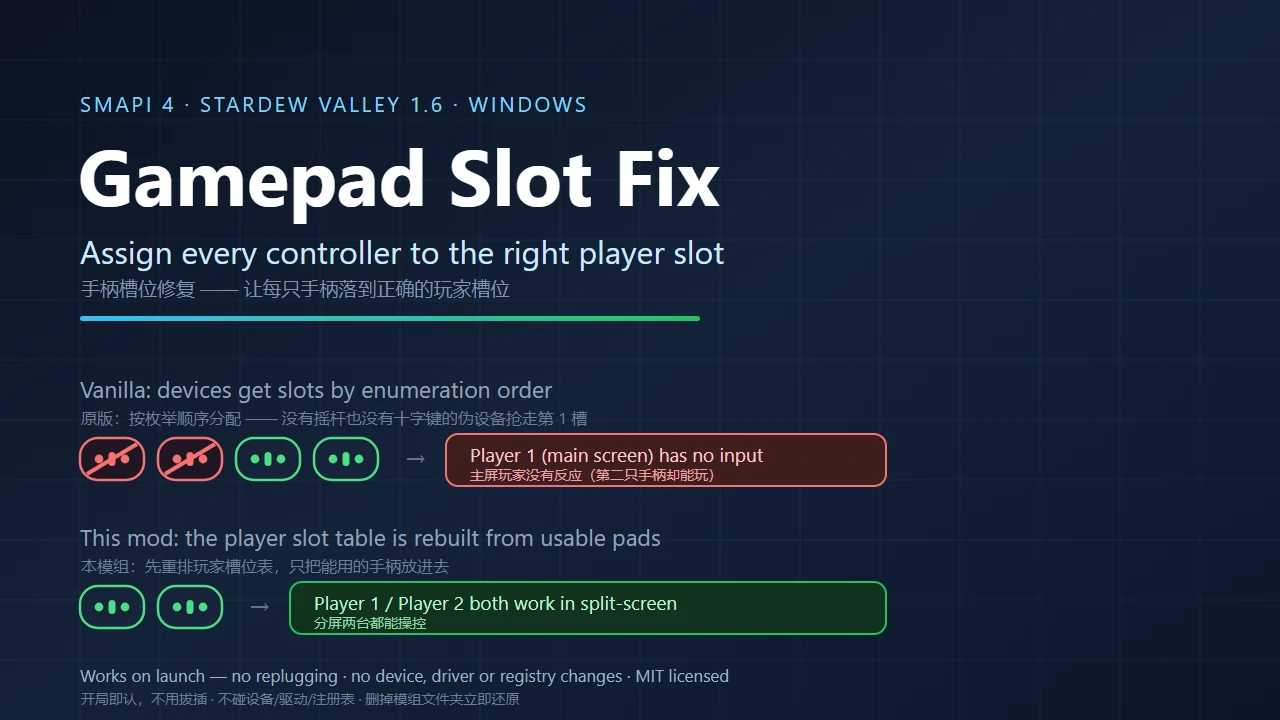
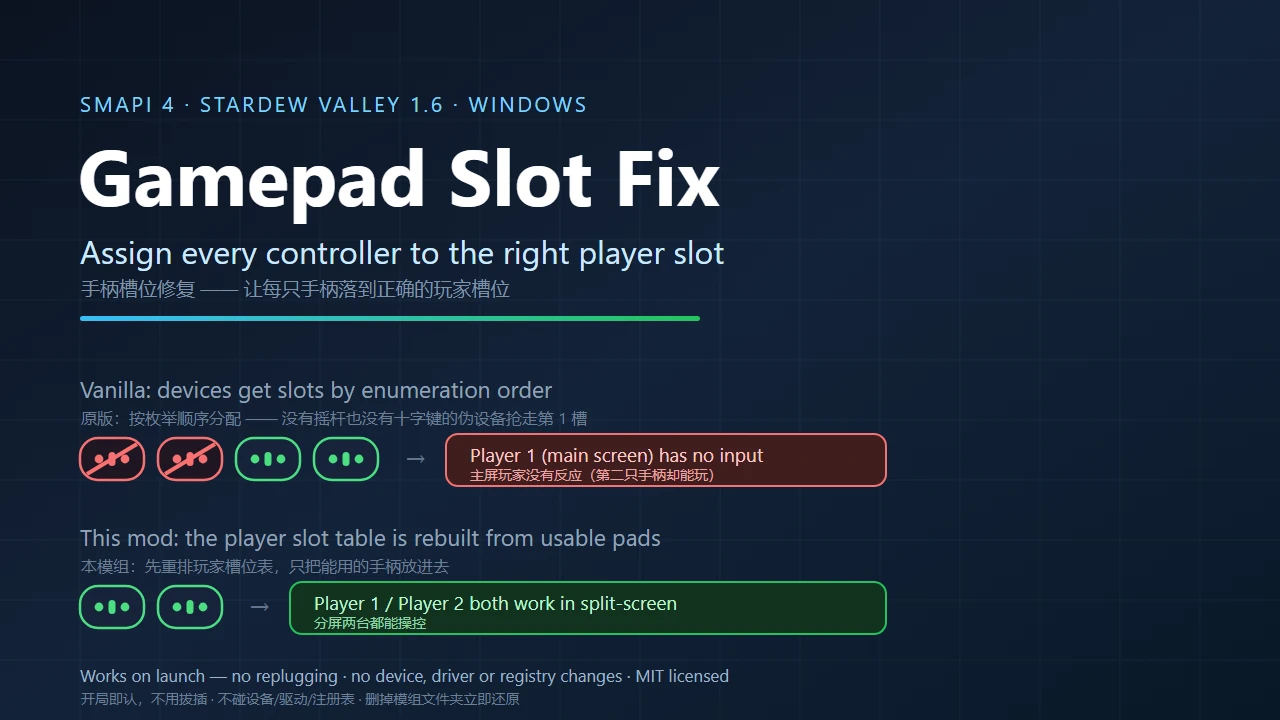
Controller plugged in but dead, or split-screen where only the second pad works? Phantom devices with no stick and no D-pad grab a player slot. This mod rebuilds the player slot table so only real pads get slots, and lets you assign a pad to player 1-4. |手柄插着没反应、分屏只有第二只能玩?无摇杆无十字键的伪设备抢了
 查看大图
Gamepad Slot Fix
Nexus #(53830) · Version 1.1.0 · by BraveTurtle · Stardew Valley 1.6+ / SMAPI 4.0.0+ · Windows
手柄插着却没反应,或者分屏里只有第二只手柄能用?那是伪设备占住了玩家槽位。
English
▸ What it fixes
- A pad that is plugged in but ignored until you unplug and replug it.
- Split-screen where the main-screen player has no input while player 2 plays fine.
- Cheap 1-to-2 / composite HID receivers exposing extra devices with no stick and no D-pad — they no longer grab a player slot.
- Which player gets which pad changing when you use a different USB port or plug them in a different order.
▸ What it does
- Device ledger: every launch lists each controller's stick / D-pad / button counts and judges it usable or not — in the SMAPI log, so you can check it yourself.
- Rebuilds the player slot table: slots are cleared and refilled with usable devices first, so slot 1 (main screen) always gets the first real pad.
- Hot-plug aware: plugging or unplugging a pad re-checks the mapping instead of leaving a dead slot.
- Manual assignment: pin a controller to player 1–4; device keys survive USB port changes and driver reinstalls.
- Whitelist safety net: if a real pad is ever judged unusable, whitelist it and it is always used.
- Fail open: every internal failure is caught and the original code path continues — a broken mod never stops you from playing.
▸ In-game menu (GMCM, optional)
- Toggles for "enable this mod" and "explain skipped devices in the log".
- Player 1–4 dropdowns listing the controllers found on this launch — no JSON editing.
- Read-only ledger summary: how many devices were found, which were judged unusable.
- Works with Generic Mod Config Menu 1.16.0; without GMCM everything still works through
config.json.
▸ Install
- Install SMAPI 4.0.0 or newer (smapi.io).
- Unzip the
GamepadSlotFixfolder into yourMods\directory — it must containmanifest.jsonandGamepadSlotFix.dll. - Start the game.
config.jsonis created on first launch.
▸ Verify it works
Search the SMAPI log for [GPADSLOT]. A healthy launch ends with:
[GPADSLOT] devices=4
#0 key=VID_20BC&PID_5500&MI_02&COL02 axes=0 buttons=24 hats=0 → SKIP
#1 key=VID_20BC&PID_5500&MI_02&COL01 axes=0 buttons=3  hats=0 → SKIP
#2 key=VID_20BC&PID_5500&MI_01       axes=6 buttons=15 hats=1 → USE
#3 key=VID_20BC&PID_5500&MI_00       axes=6 buttons=15 hats=1 → USE
[GPADSLOT] startup: GamePad 槽位表 before: count=4 keys=[0,1,2,3];需要重建槽位=True
[GPADSLOT] 槽位重建 done: 释放=[0,1,2,3] 按计划补登记=[2,3] 槽位表 after: count=2 keys=[0,1]
After the rebuild the count should equal the number of real pads and the keys should start at 0 — slot 1 now holds a real controller.
▸ Notes & safety
- No device, driver, registry or game-file changes; no save-file writes; no network access.
- Delete
Mods\GamepadSlotFixto revert completely. - Set
EnableAutoFilter: falseto keep the mod installed but inactive (no hooks at all). - Windows verified on real hardware (Stardew Valley 1.6.15, SMAPI 4.5.2); macOS/Linux unverified.
- MIT licensed. Source code is in the source download.
手柄插着却没反应,或者分屏里只有第二只手柄能用?那是伪设备占住了玩家槽位。
▸ 它修什么
- 手柄插着却被无视,非要拔插一次才认。
- 分屏下主屏玩家完全没有输入,第二只手柄却能正常玩。
- 便宜的一拖二/复合 HID 接收器多报出"没有摇杆、没有十字键"的伪设备 —— 它们不再抢走玩家槽位。
- 换 USB 口、或者插拔顺序一变,"谁是谁"就跟着变。
▸ 它做什么
- **设备台账:**每次启动列出每只手柄的摇杆数/十字键数/按键数与判定结果,写进 SMAPI 日志,你可以自己核对。
- **重建玩家槽位表:**先清空槽位,再按"可用设备优先"的顺序放回去 —— 第 1 号槽(主屏)永远给第一只真手柄。
- **热插拔也管:**插拔后重新核对映射,而不是留下一个死槽位。
- **手动指定:**可以把某只手柄钉给玩家 1~4;设备键是硬件标识,换 USB 口、重装驱动都不变。
- **白名单保险丝:**万一真手柄被误判,加进白名单就永远可用。
- **失败即放行:**任何内部异常都被捕获并放行原版流程 —— 模组出问题也不会让你玩不了游戏。
▸ 游戏内菜单(GMCM,可选)
- 两个开关:启用本模组、在日志里说明跳过了哪些设备。
- 玩家 1~4 下拉框:直接列出本次读到的设备键,不用手改 JSON。
- 只读台账摘要:本次识别到几台设备、哪几台被判为不可用。
- 支持 Generic Mod Config Menu 1.16.0;没装时
config.json照常可用。
▸ 安装
- 先装 SMAPI 4.0.0 或更高(smapi.io)。
- 把
GamepadSlotFix文件夹解压进Mods\,里面应有manifest.json与GamepadSlotFix.dll。 - 启动游戏;首次运行会生成
config.json。
▸ 怎么确认它在工作
在 SMAPI 日志里搜 [GPADSLOT],一次正常启动的关键几行长这样:
[GPADSLOT] devices=4
#0 key=VID_20BC&PID_5500&MI_02&COL02 axes=0 buttons=24 hats=0 → SKIP
#1 key=VID_20BC&PID_5500&MI_02&COL01 axes=0 buttons=3  hats=0 → SKIP
#2 key=VID_20BC&PID_5500&MI_01       axes=6 buttons=15 hats=1 → USE
#3 key=VID_20BC&PID_5500&MI_00       axes=6 buttons=15 hats=1 → USE
[GPADSLOT] startup: GamePad 槽位表 before: count=4 keys=[0,1,2,3];需要重建槽位=True
[GPADSLOT] 槽位重建 done: 释放=[0,1,2,3] 按计划补登记=[2,3] 槽位表 after: count=2 keys=[0,1]
重建之后 count 应等于真手柄数量、键从 0 起连续 —— 说明第 1 号槽已经是真手柄。
▸ 说明与安全
- 不碰设备、不碰驱动、不碰注册表、不改游戏文件、不写存档、不联网。
- 删掉
Mods\GamepadSlotFix即完全还原。 - 把
EnableAutoFilter设为false可以保留模组但完全不生效(不安装任何钩子)。 - 已在 Windows 实机验证(星露谷 1.6.15、SMAPI 4.5.2);macOS / Linux 未验证。
- MIT 许可;源码在源码包里。
正在加载版本记录…
正在加载评论…
评论在新手盒子客户端中发表,这里同步展示。