反向 撤销 还原 回滚 事件
不小心卖错物品、送错礼物,或让炸弹毁掉了正在工作的机器? 打开时光账簿,从最近的记录中选择一项,安全撤回这次操作。 Sold the wrong item, gave the wrong gift, or accidentally destroyed a working machine with a bomb? Open Time Ledger, choose a recent event, and safely undo it.
 查看大图
中文版
《时光账簿》为《星露谷物语》加入最近事件回溯功能。
它不会让整个世界倒流,也不会重新载入当天存档。模组只记录最近发生的可逆操作,让你从事件列表中选择其中一项,并在确认安全后撤回。
打开事件账簿
进入存档后按 Alt+F5 打开自己的事件面板。
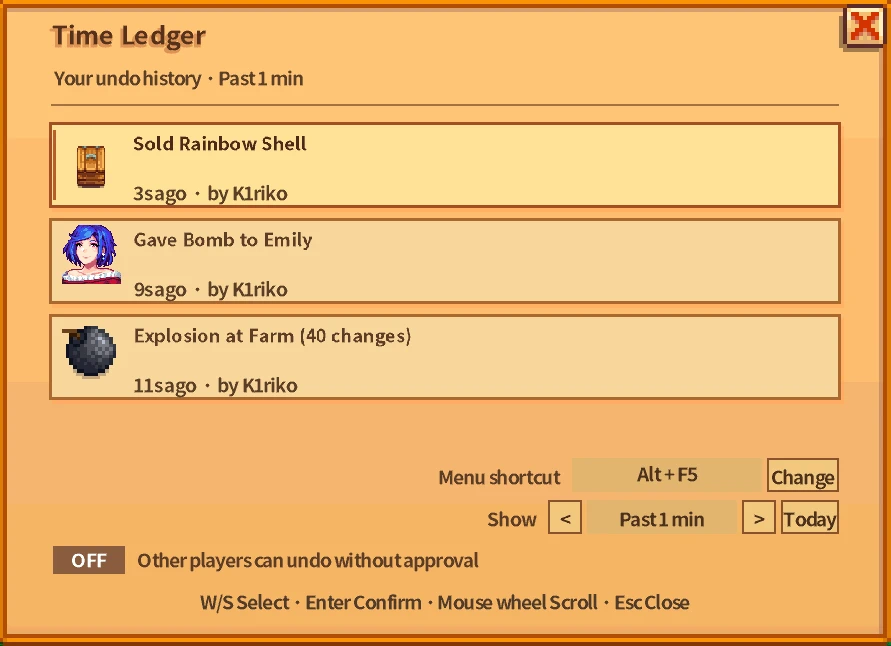
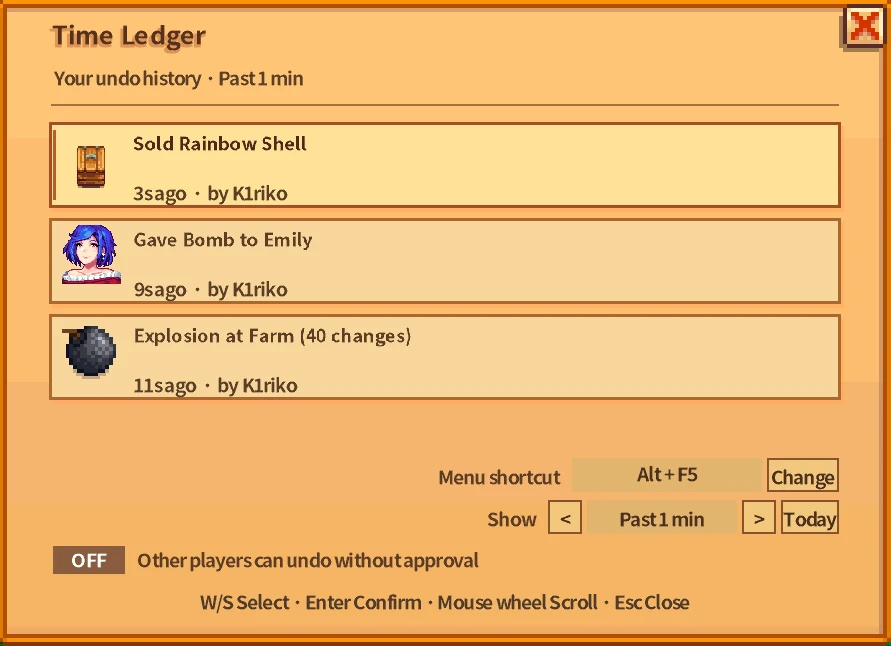
面板会列出最近可以回溯的操作,包括事件类型、相关物品、发生时间和受影响对象。使用鼠标、滚轮或
W/S 选择记录,再按
Enter 或点击“回溯”确认。
默认显示最近 60 个现实秒内的记录。你也可以在面板底部切换常用时长,或者选择“当天”,查看本游戏日内保存的全部记录。
缩短显示范围不会删除较早的事件;重新扩大范围后,它们仍会出现。
支持回溯的事件
当前版本支持:
- 在普通金币商店购买物品。
- 向普通金币商店出售物品。
- 将物品放入农场的大收集箱。
- 向普通村民赠送礼物。
- 向机器投入材料并开始加工。
- 用工具挖起仍在工作的机器。
- 放置炸弹后造成的爆炸破坏。
不同事件会使用相应的原版图标,例如物品、机器、NPC 肖像、炸弹和迷你售货箱图标,方便快速辨认。
撤回购买和出售
撤回购买时,模组会检查玩家持有的物品和金币是否仍与购买后的状态一致。验证通过后,物品会被收回,花费的金币也会退还。
撤回出售或大收集箱操作时,物品会重新回到背包。背包已满时,从大收集箱撤回的物品会生成在玩家身边,不会直接丢失。
撤回送礼
送错礼物后,可以通过时光账簿恢复送礼前的状态。
模组会检查赠送的物品、NPC 好感以及相关状态是否仍然匹配。若这些内容之后又发生了变化,为避免覆盖新的关系进度,本次回溯会被拒绝。
撤回机器操作
向机器投入错误材料,或者不小心挖起正在工作的机器时,可以尝试撤回对应记录。
时光账簿会保存并验证:
- 机器类型与所在位置。
- 机器内部的加工物品。
- 剩余加工时间。
- 玩家背包中的相关物品。
验证通过后,机器会恢复到操作发生前的状态。
恢复炸弹破坏
炸弹事件会记录爆炸造成的相关变化。
如果爆炸摧毁了正在工作的机器,回溯可以恢复机器、内部物品以及剩余加工时间。即使机器掉落物已经被玩家拾取,模组也会在恢复机器时从背包中移除对应掉落,避免复制物品。
如果爆炸后的相关地块或物品又被改变,回溯会被拒绝,以免覆盖后续操作。
关联事件处理
部分事件会依赖更早发生的操作。
例如:
- 购买一条鱼。
- 把鱼放进熏鱼机。
- 卖掉加工后的成品。
如果选择回溯最初的购买事件,后面的机器加工和出售也必须一并处理。面板会提前列出所有关联记录,并按照从新到旧的顺序撤回。
如果其中某项已经无法安全恢复,整条回溯计划会被拒绝。
安全验证
执行回溯前,模组会检查相关状态是否仍与记录一致,包括:
- 背包物品。
- 玩家金币。
- NPC 友情。
- 机器及其加工状态。
- 地块与放置物。
- 爆炸产生的掉落。
- 关联事件。
如果这些内容之后被玩家、游戏或其他 Mod 修改,时光账簿不会强行覆盖,而是取消回溯并说明原因。
联机审批
每位玩家只能看到自己的事件记录,其他玩家无法直接查看完整列表。
- 房主可以直接回溯自己的事件。
- 其他玩家确认后,会向房主发送回溯申请。
- 房主可以查看事件类型、申请玩家和影响数量,并选择批准或拒绝。
- 房主也可以开启“允许其他玩家免审批回溯”。
即使开启免审批,实际回溯仍由房主端执行,确保联机状态一致。所有参与联机的玩家都应安装相同版本的 Mod。
记录范围与保存方式
事件记录只保存在内存中:
- 换天时清空。
- 返回标题画面时清空。
- 不写入游戏存档。
- 不能跨游戏日回溯。
首次启动后,可以在
config.json 中修改:
HistorySeconds:记录显示时长,最低为 10 秒。HistorySeconds = 0:显示本游戏日的全部记录。MenuKeybind:修改面板快捷键。AllowOtherPlayersDirectUndo:允许其他玩家免审批回溯。
不支持回溯的内容
为避免破坏存档进度,以下内容不会记录为可撤回事件:
- 配方购买。
- 背包升级。
- 建筑和其他服务。
- 特殊剧情交易。
- 任务物品提交。
- 求婚物品。
- 非金币商店。
- 整天或跨天进度。
安装要求
- Stardew Valley 1.6
- SMAPI 4.0 或更高版本
- 联机玩家需要安装相同版本
- 中文版和英文版只能选择一个安装包;界面语言会跟随游戏设置
English Version
Time Ledger adds a recent-event undo system to Stardew Valley.
It does not rewind the entire world or reload the current day. Instead, it records supported actions for a limited period, lets you select an event, and restores its previous state only when doing so is still safe.
Opening Time Ledger
Press Alt+F5 after loading a save to open your personal event history.
The panel lists recent undoable actions with their event type, relevant item, age, and affected target. Select an event using the mouse, scroll wheel, or
W/S, then press
Enter or click Undo.
By default, the panel displays events from the past 60 real-time seconds. Use the controls at the bottom to switch between common time ranges or select Today to view every retained event from the current in-game day.
Reducing the visible range does not delete older records. They will reappear if you expand the range again.
Supported events
The current version can record and undo:
- Purchases from regular gold-based shops.
- Sales made to regular gold-based shops.
- Items placed in the farm’s main shipping bin.
- Gifts given to regular villagers.
- Items loaded into processing machines.
- Working machines removed with a tool.
- Damage caused by placed bombs.
Entries use familiar in-game icons, including item sprites, machines, NPC portraits, bomb types, and the mini shipping-bin icon.
Undoing purchases and sales
When undoing a purchase, the mod verifies that the relevant item and money state still match the recorded transaction. If validation succeeds, the purchased item is removed and the spent gold is returned.
When undoing a sale or shipping-bin action, the item is restored to the player. If the inventory is full, an item recovered from the main shipping bin is placed safely beside the player.
Undoing gifts
If you give the wrong item to a villager, Time Ledger can restore the state from before the gift.
The mod verifies the item, friendship value, and related NPC state first. If that relationship or item state has changed since the gift was recorded, the undo is rejected rather than overwriting newer progress.
Undoing machine actions
Loading the wrong ingredient into a machine or accidentally removing a working machine can also be undone.
Time Ledger records and validates:
- The machine type and location.
- Its processing item.
- Its remaining processing time.
- Related items in the player’s inventory.
If everything still matches, the machine is returned to its previous state.
Restoring bomb damage
Bomb events record the relevant changes caused by an explosion.
If a bomb destroys a working machine, undoing the event can restore the machine, its input, and its remaining processing time. If the dropped machine has already been collected, the matching item is removed from the inventory during restoration to prevent duplication.
If the affected tiles or items have changed since the explosion, the undo is safely rejected.
Linked events
Some actions depend on earlier events.
For example:
- You buy a fish.
- You place it in a smoker.
- You sell the processed item.
Undoing the original purchase also requires the later machine and sale events to be reverted. Time Ledger shows the complete linked plan before confirmation and processes it from newest to oldest.
If any required event can no longer be restored safely, the linked undo is rejected.
Safety validation
Before changing anything, Time Ledger checks the current state of:
- Inventory items.
- Player money.
- NPC friendship.
- Machines and processing states.
- Tiles and placed objects.
- Explosion drops.
- Linked events.
If any related state has since been changed by the player, the game, or another mod, Time Ledger cancels the undo instead of overwriting newer progress.
Multiplayer approval
Each player can only see their own complete event history.
- The host can undo their own events directly.
- Farmhands send an undo request to the host.
- The host can review the player, event type, and number of affected records before approving or denying it.
- The host may enable direct undo for other players.
Even with approval disabled, farmhand undos are still executed by the host to keep the multiplayer state synchronized. Every player should have the same version of the mod installed.
History and persistence
Event records are kept in memory only:
- They are cleared when a new day begins.
- They are cleared when returning to the title screen.
- They are never written into the save file.
- Events cannot be undone across in-game days.
The generated
config.json can be used to change:
HistorySeconds: History duration, with a minimum of 10 seconds.HistorySeconds = 0: Keep and display all records from the current day.MenuKeybind: Change the menu shortcut.AllowOtherPlayersDirectUndo: Allow farmhands to undo without individual approval.
Unsupported actions
To protect save progression, Time Ledger does not record:
- Recipe purchases.
- Backpack upgrades.
- Buildings and other services.
- Special story transactions.
- Quest turn-ins.
- Proposal items.
- Non-gold shops.
- Full-day or cross-day progress.
Requirements
- Stardew Valley 1.6
- SMAPI 4.0 or later
- The same mod version for all multiplayer players
- Install either the Chinese or English package, not both; the interface follows the game language
正在加载版本记录…
正在加载评论…
评论在新手盒子客户端中发表,这里同步展示。