WeaponRotate
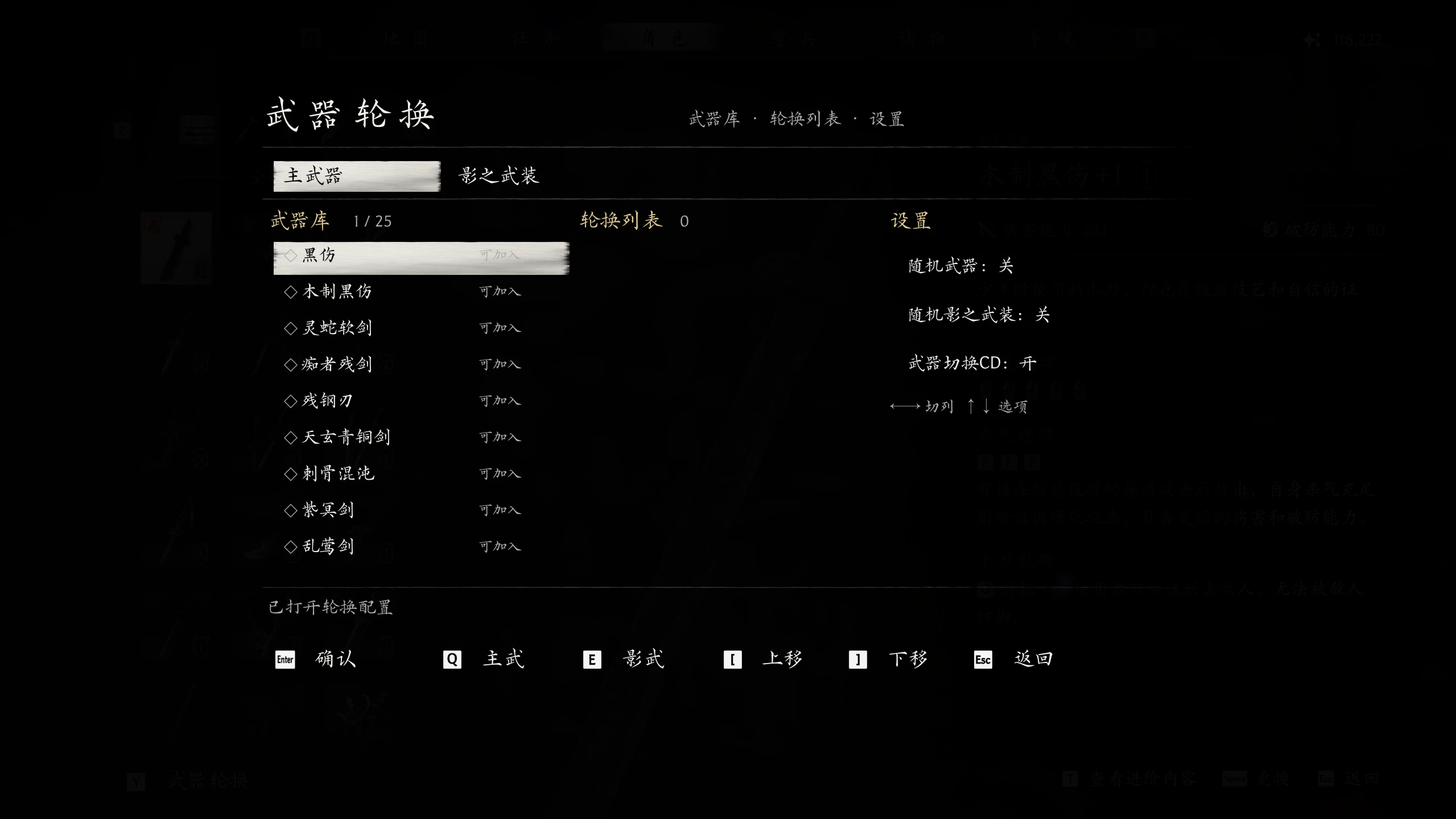
Combat rotation for MAIN WEAPONS and PHANTOM EDGES. Open Character-Equipment and press Y (pad or keyboard) to set lists, per-type random, and weapon-switch CD.
 查看大图
[size=4][b]Description [/b][/size]
[color=#D4D4D8]Rotate through more than two MAIN WEAPONS and PHANTOM EDGES in combat using the game’s native swap keys. On Character- Equipment-Equipment Selection, press Y to open the config panel and set rotation lists, per-type random, and weapon-switch CD. UI language follows the game text (Chinese / English). [/color]
[size=4][b]Requirements[/b][/size]
1. Install [url=https://www.nexusmods.com/games/phantombladezero/mods]UE4SS for Phantom Blade Zero first[/url] first (recommended: install and manage it with [url=https://www.nexusmods.com/phantombladezero/mods/2]Phantom Blade Zero - Mod Manager[/url]).
[size=4][b]Installation [/b][/size]
You can install in either of the following ways:
1. [url=https://www.nexusmods.com/phantombladezero/mods/2]Phantom Blade Zero - Mod Manager[/url]
1)Drag the Zip into the Mod Manager and enable it.
2. Manual install
1)Open platform\steam\ue4ss\Mods\ under the game root.
2)Extract the entire PBZWeaponRotate folder from the Zip into that directory.
3)The final layout should look like:
[code]..\steamapps\common\PBZ\platform\steam\ue4ss\Mods\
└─ PBZWeaponRotate\
├─ enabled.txt
├─ README.txt
└─ Scripts\
├─ main.lua
└─ ...[/code]4)If an older version exists, delete the old PBZWeaponRotate folder before placing the new one.
[size=4][b]How to use[/b][/size]
1. In game, open Character → Equip → Equip Selection and press Y (keyboard) / Y (gamepad) to open the rotate panel.
[img]https://staticdelivery.nexusmods.com/mods/10614/images/1279/1279-1794918660-331048007.png[/img]
2. Add the weapons you want to rotate into the middle Rotation list.
3. Use the right-hand Settings to toggle random and whether to clear weapon-switch CD.
4. Changes are saved automatically.
[size=4][b]Credits [/b][/size]
Thanks to ShangNian1225 ( [url=https://www.nexusmods.com/phantombladezero/mods/391]Equipment Loadouts[/url]) and KUpakupar ([url=https://www.nexusmods.com/phantombladezero/mods/997]Loadout Presets (PbzLoadout)[/url]). This mod’s equipment-page UI interaction was informed by their work.
[line]
[color=#D4D4D8][size=4][b]简介[/b][/size][/color]
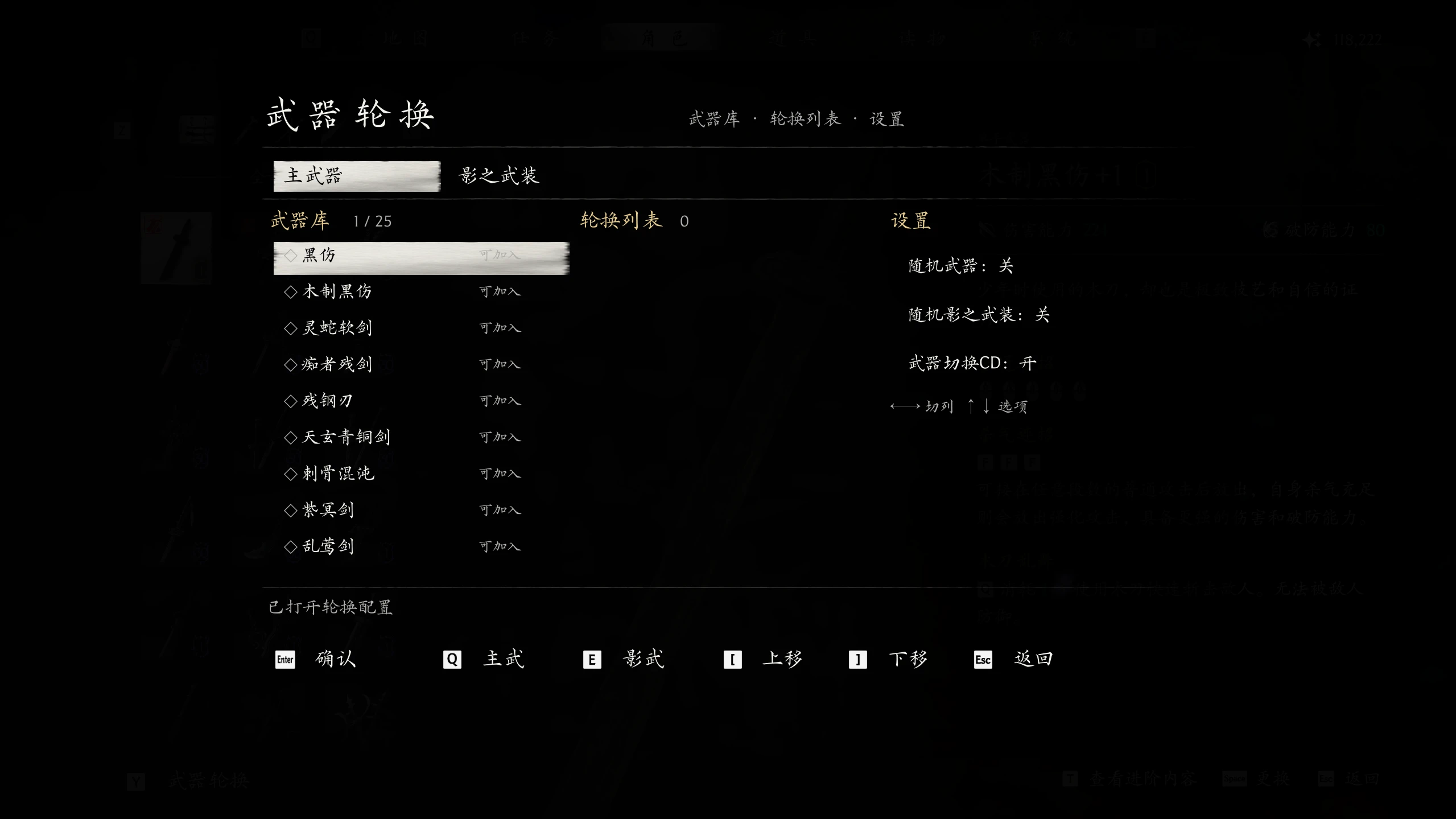
[color=#D4D4D8]战斗中用游戏原生换武键,轮换超过两把主武器和影之武装。在角色-装备选择页按 Y 打开配置面板,设置轮换列表、分类随机与武器切换 CD。界面语言跟随游戏文本(中文 / 英文)。 [/color]
[color=#D4D4D8][size=4][b]前置条件 [/b][/size][/color]
[color=#d4d4d8]1. 需要 [/color][url=https://www.nexusmods.com/games/phantombladezero/mods]UE4SS for Phantom Blade Zero first[/url](建议直接用 [url=https://www.nexusmods.com/phantombladezero/mods/2]Phantom Blade Zero - Mod Manager[/url] 安装和管理)。
[b][size=4]安装方式[/size][/b]
[color=#D4D4D8]可以通过如下2种方式进行安装:[/color]
[color=#D4D4D8]1. 使用 [url=https://www.nexusmods.com/phantombladezero/mods/2]Phantom Blade Zero - Mod Manager[/url]。[/color]
[color=#D4D4D8]1)直接将 Zip 文件拖入 Mod 管理器,启用即可。[/color]
[color=#D4D4D8]2. 手动安装:[/color]
[color=#D4D4D8]1) 打开游戏根目录下的 platform\steam\ue4ss\Mods\[/color]
[color=#D4D4D8]2) 将压缩包内的 PBZWeaponRotate 文件夹整体解压到该目录[/color]
[color=#D4D4D8]3) 最终路径应为:[/color]
[code]..\steamapps\common\PBZ\platform\steam\ue4ss\Mods\
└─ PBZWeaponRotate\
├─ enabled.txt
├─ README.txt
└─ Scripts\
├─ main.lua
└─ ...[/code][color=#D4D4D8]4) 若已有旧版,请先删除旧的 PBZWeaponRotate [/color][color=#d4d4d8]文件夹再放入新版[/color]
[size=4][b]使用方式[/b][/size]
1. 进入游戏,在“角色-装备-装备选择页”中按下Y(键盘)/ Y(手柄),即可进入轮换页
[img]https://staticdelivery.nexusmods.com/mods/10614/images/1279/1279-1794917060-1876925285.png[/img]
2. 将希望进行轮换的武器加入中间轮换列表即可
3. 右侧设置可设置是否随机和是否消除武器切换CD
4. 选择后自动保存,即可直接在游戏中生效
[size=4][b]致谢[/b][/size]
感谢 [url=https://www.nexusmods.com/phantombladezero/mods/391]Equipment Loadouts[/url] 的作者 ShangNian1225 和 [url=https://www.nexusmods.com/phantombladezero/mods/997]Loadout Presets (PbzLoadout)[/url] 的作者 KUpakupar,本 Mod 装备页 UI 交互参考了上述作品。


正在加载版本记录…
正在加载评论…
评论在新手盒子客户端中发表,这里同步展示。