pbz 伤害测试
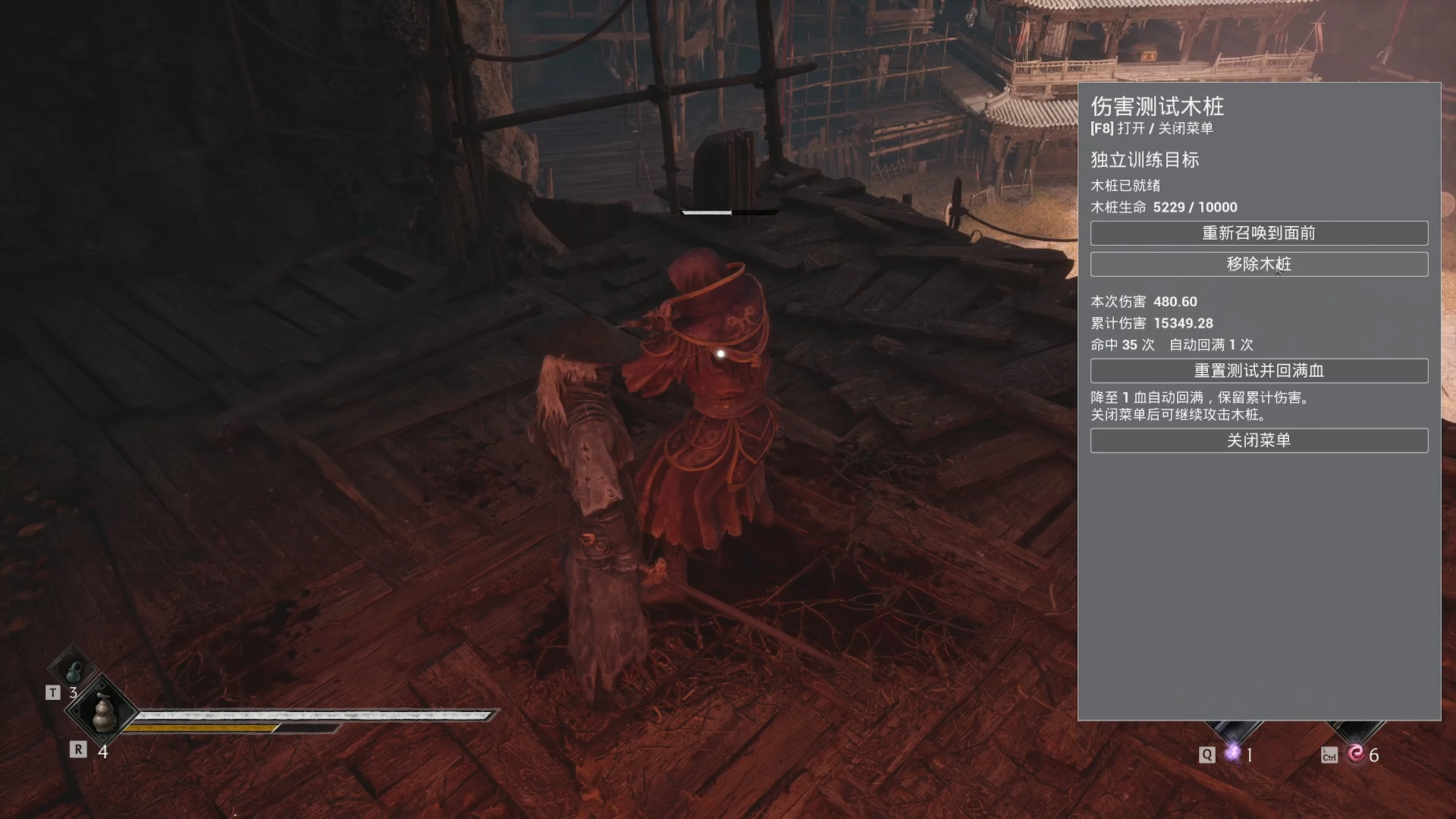
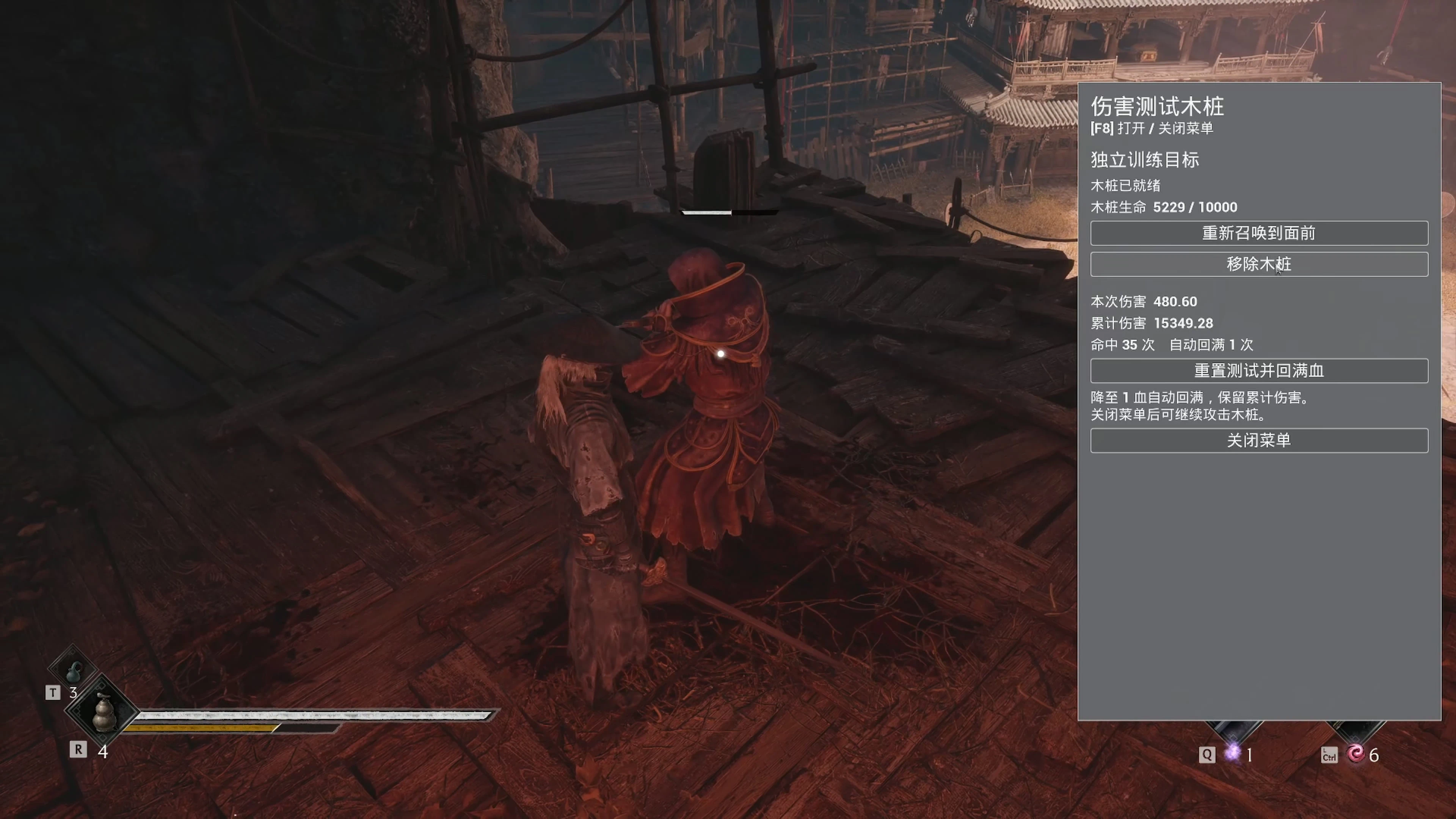
用游戏内菜单(默认 F8)召唤一个不会还手的训练木桩,有 10000 血,血量降到 1 时自动回满。可以看到单次伤害、累计伤害和命中次数,用来测试攻击和连招的伤害。基于 UE4SS,当前为预览版。 Spawn a non-hostile training dummy from an in-game menu (F8 by default) to test attack and co
 查看大图
🇨🇳 中文版
模组简介
影之刃零:伤害测试木桩(PBZ Training Dummy)
介绍视频链接:https://www.bilibili.com/video/BV1ni4P6EE9m/
在游戏里随时召唤一个训练木桩,用来测试招式和连招打出多少生命伤害。
木桩不会还手,有 10000 血,血量降到 1 时自动回满,可以一直打。菜单会显示最近一次伤害、累计伤害和命中次数,适合比较不同招式、连招或配装的伤害。木桩用的是游戏自带的金面人训练资产,外观是人形。
⚠️ 当前为预览版。普通攻击和连招已经测过。
安装说明
下载时有两种包可选,只选一个:
| 包 | 适用情况 |
|---|---|
| mod-only | 已经装了 UE4SS(包括装了其他 UE4SS 模组的情况) |
| with-UE4SS | 还没装 UE4SS 或其他模组加载器 |
▶ mod-only(已有 UE4SS)
- 完全退出游戏。
- 找到你当前实际在用的 UE4SS 的
Mods目录。 - 把整个
PBZTrainingDummy文件夹复制进去。 - 在
mods.txt里加一行:
⚠️ 不要用包里的PBZTrainingDummy : 1mods.txt覆盖你原来的。 - 启动游戏,进入可以自由行动的场景后按 F8。
装了 PBZHitEnhance / UnifiedHitstop 整合包的:把本模组放到那个整合包的
ue4ss/Mods目录,再改它的mods.txt。不需要改 ini,也不需要换 DLL。
▶ with-UE4SS(还没装 UE4SS)
- 完全退出游戏,确认游戏目录里没有其他 UE4SS 或代理 DLL(比如
dxgi.dll、version.dll、dinput8.dll)。 - 在 Steam 里打开游戏本地文件,找到
PBZ.exe所在的目录(一般是<游戏目录>/platform/steam/)。 - 把
dwmapi.dll和整个ue4ss文件夹复制到PBZ.exe旁边:PBZ.exe dwmapi.dll ue4ss/ - 从 Steam 正常启动游戏,按 F8。
▶ 卸载 / 更新
- 卸载:删除
PBZTrainingDummy文件夹,并把mods.txt里的这一行改成: 0或删掉。 - 更新:先备份
config.ini,覆盖模组文件夹后再把备份放回来。
主要功能
- 游戏内菜单:默认 F8 打开(可以改键),在菜单里召唤木桩、把木桩重新召唤到面前、移除木桩、重置统计
- 不会还手的木桩:10000 血,降到 1 血自动回满,累计伤害继续保留
- 伤害统计:最近一次伤害、累计伤害、命中次数、自动回满次数;多段攻击按每次伤害分别计数
- 完整的生命伤害:直接读取游戏的伤害数据,超出剩余血量的部分也会算进去;架势伤害、怒气伤害不算作生命伤害
- 不触发战斗音乐:打木桩时不会切成战斗音乐,普通敌人的战斗音乐照常
- 不影响存档:同一时间只有一个木桩,切换场景或角色时自动清理,不会写进存档
- 可以改键:编辑
PBZTrainingDummy/config.ini,重启游戏后生效[Keybinds] MenuToggle = F9
使用方法:找一块平坦、前面有空地的地方 → 按 F8 →「召唤木桩」→ 等大约 1 秒出现「木桩已就绪」→ 关掉菜单开始打 → 再按 F8 看统计。
注意
- 木桩保留了训练资产自带的防御属性,数值适合在同一个木桩上做对比,不代表打所有敌人的实际伤害。
- 召唤后约 1 秒内不要攻击。在半空、窄地方或斜坡上可能召唤失败。
- 按 F8 没反应:先确认已经进入场景,再看
UE4SS.log里有没有[PBZTrainingDummy] loaded。
前置要求
- UE4SS(PBZ 专用版):用 mod-only 包时必须先装好;with-UE4SS 包里已经带了
- 测试过的版本:KintaroModding 的 PBZ 专用版
v3.0.1-1183-gcdbc0b66
- 测试过的版本:KintaroModding 的 PBZ 专用版
- 游戏版本:测试过 Steam build
26266538(UE 5.7.4),其他版本没测过 - 没有其他前置模组。和 UnifiedHitstop 一起装过,可以正常使用。
致谢
- Narknon 和 UE4SS 的所有贡献者:做出了 UE4SS 这个模组框架
- KintaroModding:维护影之刃零专用的 UE4SS 版本(https://github.com/KintaroModding/ue4ss)
- Matthew arvidson(mattdavida):做了 ue4ss-ModMenu 菜单库(https://github.com/mattdavida/ue4ss-ModMenu)
- 以及灵游坊 S-GAME 做出《影之刃零》
源码与问题反馈:https://github.com/xbunax/pbz_damage_test
🇬🇧 English Version
Description
Phantom Blade Zero – Training Dummy / Damage Tester
Spawn a training dummy anytime in-game and see how much HP damage your moves and combos deal.
The dummy never attacks back, has 10,000 HP, and refills to full at 1 HP, so you can keep hitting it. The menu shows your last hit, total damage and hit count, which makes it easy to compare moves, combos and builds. The dummy uses the game's own golden-mask training asset, so it looks like a person.
⚠️ This is a preview release. Normal attacks and combos have been tested. Executions, damage over time and every weapon combination have not been fully tested yet. ℹ️ The in-game menu is in Chinese only. See the button guide below.
Installation instructions
There are two downloads. Pick only one:
| Package | Use it if |
|---|---|
| mod-only | You already have UE4SS installed (including if you use other UE4SS mods) |
| with-UE4SS | You don't have UE4SS or any other mod loader yet |
▶ mod-only (UE4SS already installed)
- Close the game completely.
- Find the
Modsfolder of the UE4SS install the game actually loads. - Copy the whole
PBZTrainingDummyfolder into it. - Add this line to your
mods.txt:
⚠️ Don't overwrite yourPBZTrainingDummy : 1mods.txtwith the one in the package. - Launch the game, go to a level where you can move freely, and press F8.
If you use the PBZHitEnhance / UnifiedHitstop bundle, put this mod in that bundle's
ue4ss/Modsfolder and edit itsmods.txt. You don't need to change any ini file or replace any DLL.
▶ with-UE4SS (no UE4SS yet)
- Close the game completely. Make sure the game folder has no other UE4SS install or proxy DLLs (such as
dxgi.dll,version.dllordinput8.dll). - In Steam, browse the game's local files and find the folder with
PBZ.exe(usually<game folder>/platform/steam/). - Copy
dwmapi.dlland the wholeue4ssfolder next toPBZ.exe:PBZ.exe dwmapi.dll ue4ss/ - Launch the game normally through Steam and press F8.
▶ Uninstall / Update
- Uninstall: delete the
PBZTrainingDummyfolder, then set its line inmods.txtto: 0or delete the line. - Update: back up
config.ini, replace the mod folder, then put your backed-upconfig.iniback.
Main features
- In-game menu: opens with F8 by default (you can change the key). Use it to spawn the dummy, bring it back in front of you, remove it, or reset the stats
- Dummy that never attacks: 10,000 HP and refills to full at 1 HP. Total damage keeps counting through refills
- Damage stats: last hit, total damage, hit count and refill count. Each hit of a multi-hit attack is counted separately
- Full HP damage: reads the game's own damage data, so damage past the dummy's remaining HP still counts. Posture and rage damage are not counted as HP damage
- No combat music: hitting the dummy doesn't start combat music. Real enemies still trigger it as usual
- Save-safe: only one dummy exists at a time. It's removed when you change level or character and is never saved to your save file
- Change the menu key: edit
PBZTrainingDummy/config.ini, then restart the game[Keybinds] MenuToggle = F9
Menu buttons
| In-game text | Meaning |
|---|---|
| 召唤木桩 | Spawn dummy |
| 重新召唤到面前 | Re-spawn in front of you |
| 移除木桩 | Remove dummy (keeps stats) |
| 重置测试并回满血 | Reset stats & refill HP |
| 木桩已就绪 | Dummy is ready |
How to use: Find flat, open ground → press F8 → 召唤木桩 → wait about 1 second for 木桩已就绪 → close the menu and attack → press F8 again to see the stats.
Notes
- The dummy keeps the defence stats of the game's training asset. Use the numbers to compare attacks on this dummy, not to predict damage against every enemy.
- Don't attack during the ~1 second setup after spawning. Spawning can fail in mid-air, in tight spaces or on slopes.
- F8 does nothing? Make sure you're in a level, then look for
[PBZTrainingDummy] loadedinUE4SS.log.
Requirements
- UE4SS (Phantom Blade Zero build): required for the mod-only package. The with-UE4SS package already includes it
- Tested with KintaroModding's PBZ build
v3.0.1-1183-gcdbc0b66
- Tested with KintaroModding's PBZ build
- Game version: tested on Steam build
26266538(UE 5.7.4). Other versions haven't been tested - No other mods are required. Works alongside UnifiedHitstop.
Shout outs
- Narknon and all UE4SS contributors, for the UE4SS modding framework
- KintaroModding, for maintaining the Phantom Blade Zero build of UE4SS (https://github.com/KintaroModding/ue4ss)
- Matthew arvidson (mattdavida), for the ue4ss-ModMenu library (https://github.com/mattdavida/ue4ss-ModMenu)
- And S-GAME, for making Phantom Blade Zero
Source code & bug reports: https://github.com/xbunax/pbz_damage_test
正在加载版本记录…
正在加载评论…
评论在新手盒子客户端中发表,这里同步展示。