NVIDIA DLSS 帧生成 3x 和 4x 解锁 (MFG 解锁)
在 RTX 40 系上解锁 NVIDIA DLSS 多帧生成:游戏原本上限 2x,装上后可在游戏内图形设置里选 3x/4x。ReShade 插件,支持模组管理器与手工安装,不替换任何 NVIDIA 文件。
 查看大图
[size=5][b]中文说明[/b][/size]
《影之刃零》带 DLSS 帧生成(走 NVIDIA Streamline),但 RTX 40 系上驱动只放行 2x。本包加一个 ReShade 插件,把 DLSS-G provider 的门禁打开,让游戏自己的图形设置能选到 3x 和 4x。
倍率交给游戏控制,不强制:照常进图形设置选 2x/3x/4x 即可。RTX 50 系本来就有原生多帧生成,用不上这个。DLSS 超分、光线重建都不动,也不替换任何 DLSS/Streamline/NGX 文件。
[size=4][b]前置条件[/b][/size]
[list]
[]《影之刃零》Steam 版(appid 4115450),单人游戏[/]
[]RTX 40 系显卡,NVIDIA 驱动 595.41 或更新[/]
[]游戏内把 DLSS 帧生成打开[/]
[]Windows 10/11 64 位,ReShade 已包含[/]
[/list]
[size=4][b]用 UE Mod Manager 安装[/b][/size]
[list=1]
[]UE Mod Manager 1.4.0 或更新:[url=https://www.nexusmods.com/phantombladezero/mods/2]Phantom Blade Mod Manager[/url]。更旧的版本装不了这类模组;程序启动会自己提示更新。[/]
[]打开它,它会自己找到《影之刃零》。[/]
[]把 zip 拖到窗口,或用添加模组的按钮选中它。[/]
[]出现一个「Game files」部件,文件落到 [font=Courier New]platform\steam[/font]。勾选并安装。UE MM 会先备份被覆盖的同名文件,关掉或卸载模组时原样放回。[/]
[]启动游戏,把 DLSS 帧生成打开。[/]
[/list]
[size=4][b]手工安装[/b][/size]
[list=1]
[]退出游戏,任务管理器里确认没有残留的 [font=Courier New]PBZ.exe[/font]。[/]
[]打开 [font=Courier New]...\steamapps\common\PBZ[/font](有 [font=Courier New]ProjectPBZ[/font]、[font=Courier New]Engine[/font]、[font=Courier New]platform[/font] 的那个目录)。[/]
[]如果 [font=Courier New]platform\steam[/font] 里已有同名文件,先挪走,例如放到 [font=Courier New]platform\steam\_backup_mfg\[/font]。[/]
[]把 zip 解压到游戏目录,让它自带的 [font=Courier New]platform[/font] 文件夹与游戏的合并。[font=Courier New]platform\steam[/font] 里应有 [font=Courier New]dxgi.dll[/font](5,592,064 字节)、[font=Courier New]renodx-mfgunlock.addon64[/font](10,560,512 字节)和 [font=Courier New]ReShade.ini[/font]。[/]
[]启动游戏,把 DLSS 帧生成打开。[/]
[/list]卸载:在 UE MM 里关掉模组,或删掉这几个文件、把原来的补回去。
[size=4][b]倍率[/b][/size]
到游戏的图形设置里选倍率。插件只负责把游戏能申请的上限抬到 4([font=Courier New]MaxCount=4[/font]),倍率由游戏决定。
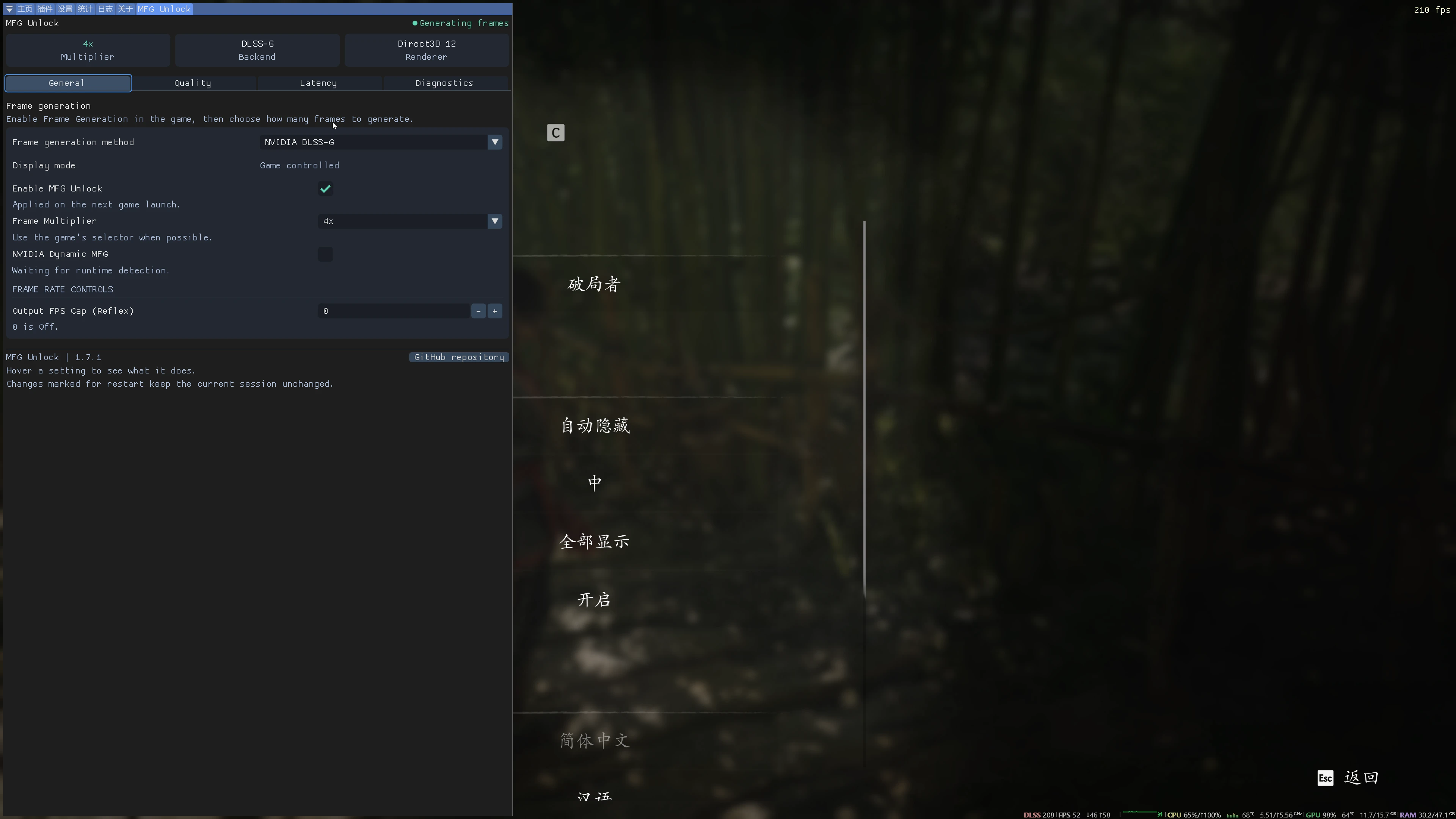
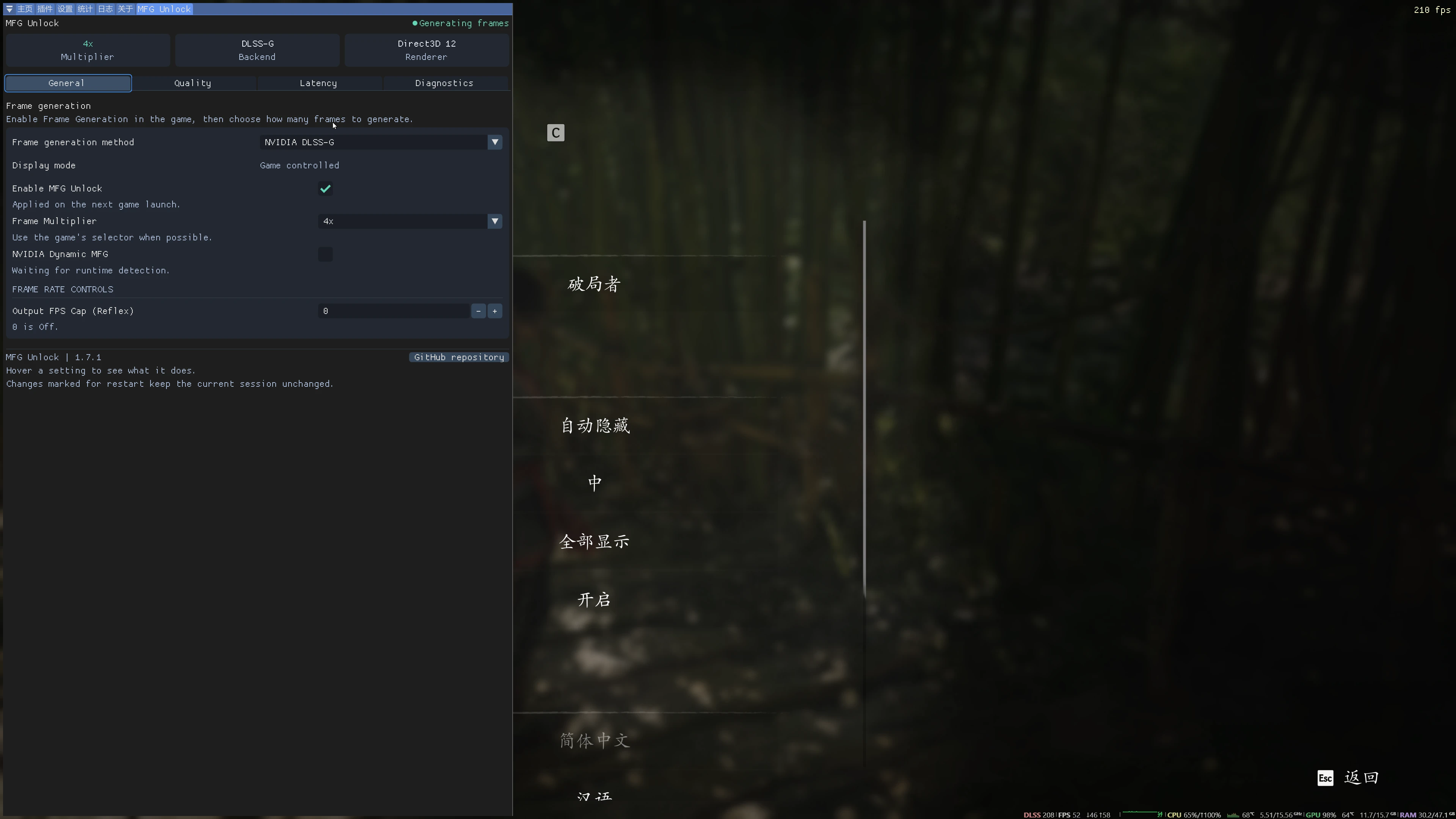
如果你的版本只有帧生成开关、没有倍率选项,就固定一个:打开 [font=Courier New]platform\steam\ReShade.ini[/font] 的 [font=Courier New][RenoDX.MFGUnlock][/font] 段,把 [font=Courier New]ForceMultiplier=0[/font] 改成 3 或 4,再启动游戏;也可以在游戏里按 Home →「MFG Unlock」→ Frame multiplier 改。
本机 RTX 4080 SUPER、3840x2160、4x 实测:基础帧约 52 → 实际呈现约 210 fps。3x 更轻、余量更多。
[size=4][b]怎么确认生效[/b][/size]
[font=Courier New]platform\steam\ReShade.log[/font] 里应有:
[code]Registered add-on "MFG Unlock" v1.7.1.0 using ReShade API version 18.
mfgunlock: architecture gates committed; provider candidate session=3 ...
mfgunlock: slDLSSGGetState reports 3 frame(s) actually presented since its previous call.[/code]这个计数跟着游戏要的倍率走,3x 报 3、4x 报 4。设了固定倍率时日志里还会多一行 [font=Courier New]overriding DLSS-G numFramesToGenerate from 1 (2x) to 3 (4x)[/font]。ReShade 面板(Home → MFG Unlock)能实时看同样的数字。
[size=4][b]如果那个目录里已经有别的东西[/b][/size]
[list]
[]别的 ReShade 宿主(例如 DLSS 5 模组)也用 [font=Courier New]dxgi.dll[/font] 和 [font=Courier New]ReShade.ini[/font]。只留一个 [font=Courier New]dxgi.dll[/font],把两个插件写进同一行:
[font=Courier New][ADDON] LoadFromDllMain=renodx-mfgunlock.addon64,renodx-dlss5.addon64[/font]
不要同时跑两份 ReShade。[/]
[]游戏因为 exe 旁边的 [font=Courier New]dxgi.dll[/font] 起不来,就把它改名成 [font=Courier New]version.dll[/font]——游戏两个名字都导入。两个只能留一个。[/]
[][url=https://www.nexusmods.com/phantombladezero/mods/5]UE4SS[/url] 用的是同目录的 [font=Courier New]dwmapi.dll[/font],与 [font=Courier New]dxgi.dll[/font] 不冲突。[/]
[/list]
[size=4][b]已知问题[/b][/size]
[list]
[]游戏实际用的是 NVIDIA OTA 提供的 DLSS-G provider(本机 310.9.16),不是游戏目录里那份 310.9.1。两者都在插件支持范围内。[/]
[]NVIDIA App 的覆盖优先于游戏设置:把「DLSS Override - Frame Generation」两处(全局 + 该游戏)都设回 "Use the 3D application setting"。[/]
[]装完第一次启动会编译 DLSS-G 内核,卡一下属正常,重启一次再评。[/]
[]游戏更新可能换掉 Streamline 或 DLSS 文件。面板里版本掉出 310.9.x / 2.14.x 就更新或卸载。[/]
[/list]
[size=4][b]为什么不是 .pak[/b][/size]
代理 DLL 必须在进程启动、D3D12 设备创建之前加载;pak 只能替换内容和脚本。所以本包装在 [font=Courier New]PBZ.exe[/font] 旁边,而不是 [font=Courier New]~mods[/font] 里。
[size=4][b]致谢[/b][/size]
[list]
[]ReShade 6.8.0:crosire — [url=https://reshade.me]reshade.me[/url][/]
[]RenoDX MFG Unlock 1.7.1:ImDreamt — [url=https://github.com/mavismmg/MFGAdaUnlock-RenoDx]github.com/mavismmg/MFGAdaUnlock-RenoDx[/url],dashdogy 的 [url=https://github.com/dashdogy/MFG-Unlocker]MFG-Unlocker[/url] 分支[/]
[]UE Mod Manager:[url=https://www.nexusmods.com/phantombladezero/mods/2]Phantom Blade Mod Manager[/url][/]
[/list]ReShade.ini 与这份说明是为《影之刃零》写的。许可证全文见 [font=Courier New]THIRD-PARTY-NOTICES.txt[/font]。本包不含任何 NVIDIA 文件,与 NVIDIA、Intel、S-Game 均无关联。
[line]
[line]
[size=5][b]RTX 40 上的 3x 与 4x 帧生成[/b][/size]
《影之刃零》通过 NVIDIA Streamline 支持 DLSS 帧生成,但在 RTX 40 系显卡上驱动只允许 2x。本包添加了一个 ReShade 插件,打开 DLSS-G provider 中的门禁,让游戏自带的视频设置能够提供 3x 和 4x。
倍率由游戏掌控——不强制任何值。像往常一样在游戏中选择 2x、3x 或 4x。在 RTX 50 系显卡上 NVIDIA 已原生启用多帧生成,因此这项对它们无用。DLSS 超分辨率与光线重建不受影响,也不会替换任何 DLSS、Streamline 或 NGX 文件。
[size=4][b]前置条件[/b][/size]
[list]
[]Steam 版《影之刃零》(appid 4115450),单人游戏[/]
[]RTX 40 系显卡,NVIDIA 驱动 595.41 或更新[/]
[]在游戏的视频设置中打开 DLSS 帧生成[/]
[]Windows 10/11 x64——已包含 ReShade[/]
[/list]
[size=4][b]用 UE Mod Manager 安装[/b][/size]
[list=1]
[]UE Mod Manager 1.4.0 或更新:[url=https://www.nexusmods.com/phantombladezero/mods/2]Phantom Blade Mod Manager[/url]。更旧的版本无法安装这类模组;程序会在启动时自行更新。[/]
[]打开它——它会自行找到《影之刃零》。[/]
[]把这个 zip 拖到窗口上,或用添加模组按钮选中它。[/]
[]出现一个部件,[b]Game files[/b],落到 [font=Courier New]platform\steam[/font]。勾选它并安装。UE MM 会备份它替换掉的任何文件,并在你禁用或移除模组时还原。[/]
[]启动游戏并打开 DLSS 帧生成。[/]
[/list]
[size=4][b]手工安装[/b][/size]
[list=1]
[]关闭游戏,在任务管理器中检查是否有残留的 [font=Courier New]PBZ.exe[/font]。[/]
[]打开 [font=Courier New]...\steamapps\common\PBZ[/font]——即包含 [font=Courier New]ProjectPBZ[/font]、[font=Courier New]Engine[/font] 和 [font=Courier New]platform[/font] 的文件夹。[/]
[]如果这些文件已存在于 [font=Courier New]platform\steam[/font] 中,先将它们移到别处,例如 [font=Courier New]platform\steam\_backup_mfg\[/font]。[/]
[]将 zip 解压到游戏文件夹,使其 [font=Courier New]platform[/font] 文件夹与游戏的合并。[font=Courier New]platform\steam[/font] 之后应包含 [font=Courier New]dxgi.dll[/font](5,592,064 字节)、[font=Courier New]renodx-mfgunlock.addon64[/font](10,560,512 字节)和 [font=Courier New]ReShade.ini[/font]。[/]
[]启动游戏并打开 DLSS 帧生成。[/]
[/list]两种方式卸载:在 UE MM 中关闭模组,或删除这些文件并放回你自己的文件。
[size=4][b]倍率[/b][/size]
打开游戏的视频设置并在那里选择倍率。插件只提高游戏可申请的上限([font=Courier New]MaxCount=4[/font]);由游戏决定。
如果你的版本只有帧生成开/关切换,请改为设置固定值:在 [font=Courier New]platform\steam\ReShade.ini[/font] 的 [font=Courier New][RenoDX.MFGUnlock][/font] 段中,将 [font=Courier New]ForceMultiplier=0[/font] 改为 3 或 4 并启动游戏。或者在游戏内操作:Home,MFG Unlock 标签页,Frame multiplier。
本机在 RTX 4080 SUPER、3840x2160、4x 下实测:基础帧约 52 fps 变为实际呈现约 210 fps。3x 更轻、余量更多。
[size=4][b]确认生效[/b][/size]
[font=Courier New]platform\steam\ReShade.log[/font] 应显示:
[code]Registered add-on "MFG Unlock" v1.7.1.0 using ReShade API version 18.
mfgunlock: architecture gates committed; provider candidate session=3 ...
mfgunlock: slDLSSGGetState reports 3 frame(s) actually presented since its previous call.[/code]该计数跟随游戏所要求的倍率——3x 时为 3,4x 时为 4。设置固定倍率时,日志会额外显示 [font=Courier New]overriding DLSS-G numFramesToGenerate from 1 (2x) to 3 (4x)[/font]。ReShade 面板(Home,MFG Unlock)会实时显示相同的数字。
[size=4][b]如果那个文件夹里已有别的东西[/b][/size]
[list]
[]另一个 ReShade 宿主——例如 DLSS 5 模组——也使用 [font=Courier New]dxgi.dll[/font] 和 [font=Courier New]ReShade.ini[/font]。只保留一个 [font=Courier New]dxgi.dll[/font],并将两个插件列在同一行:
[font=Courier New][ADDON] LoadFromDllMain=renodx-mfgunlock.addon64,renodx-dlss5.addon64[/font]
切勿同时运行两份 ReShade。[/]
[]如果游戏因 exe 旁边的 [font=Courier New]dxgi.dll[/font] 无法启动,请将其重命名为 [font=Courier New]version.dll[/font]。游戏会导入这两个名称;只保留一个。[/]
[][url=https://www.nexusmods.com/phantombladezero/mods/5]UE4SS[/url] 使用同一文件夹中的 [font=Courier New]dwmapi.dll[/font],与 [font=Courier New]dxgi.dll[/font] 不冲突。[/]
[/list]
[size=4][b]已知问题[/b][/size]
[list]
[]游戏持续使用 NVIDIA OTA 提供的 DLSS-G provider(本机为 310.9.16),而非其自身文件夹中的 310.9.1 副本。两者均在插件支持范围内。[/]
[]NVIDIA App 的覆盖优先于游戏:将「DLSS Override - Frame Generation」两处(全局和此游戏)都设为 "Use the 3D application setting"。[/]
[]安装后首次启动会编译 DLSS-G 内核——预计会卡顿,重启一次。[/]
[]游戏补丁可能替换 Streamline 或 DLSS 文件。如果面板显示版本超出 310.9.x / 2.14.x,请更新或移除此模组。[/]
[/list]
[size=4][b]为什么不是 .pak[/b][/size]
代理 DLL 必须在进程启动时、D3D12 设备创建之前加载。Pak 只能替换内容和脚本,因此本包装在 [font=Courier New]PBZ.exe[/font] 旁边,而不是放进 [font=Courier New]~mods[/font]。
[size=4][b]致谢[/b][/size]
[list]
[]ReShade 6.8.0:crosire — [url=https://reshade.me]reshade.me[/url][/]
[]RenoDX MFG Unlock 1.7.1:ImDreamt — [url=https://github.com/mavismmg/MFGAdaUnlock-RenoDx]github.com/mavismmg/MFGAdaUnlock-RenoDx[/url],dashdogy 的 [url=https://github.com/dashdogy/MFG-Unlocker]MFG-Unlocker[/url] 分支[/]
[]UE Mod Manager — [url=https://www.nexusmods.com/phantombladezero/mods/2]Phantom Blade Mod Manager[/url][/]
[/list]ReShade.ini 与这些说明由我编写,为《影之刃零》而写。许可证全文见 [font=Courier New]THIRD-PARTY-NOTICES.txt[/font]。本包不含任何 NVIDIA 文件。与 NVIDIA、Intel 或 S-Game 均无关联。
正在加载版本记录…
正在加载评论…
评论在新手盒子客户端中发表,这里同步展示。