卡牌游戏黑客
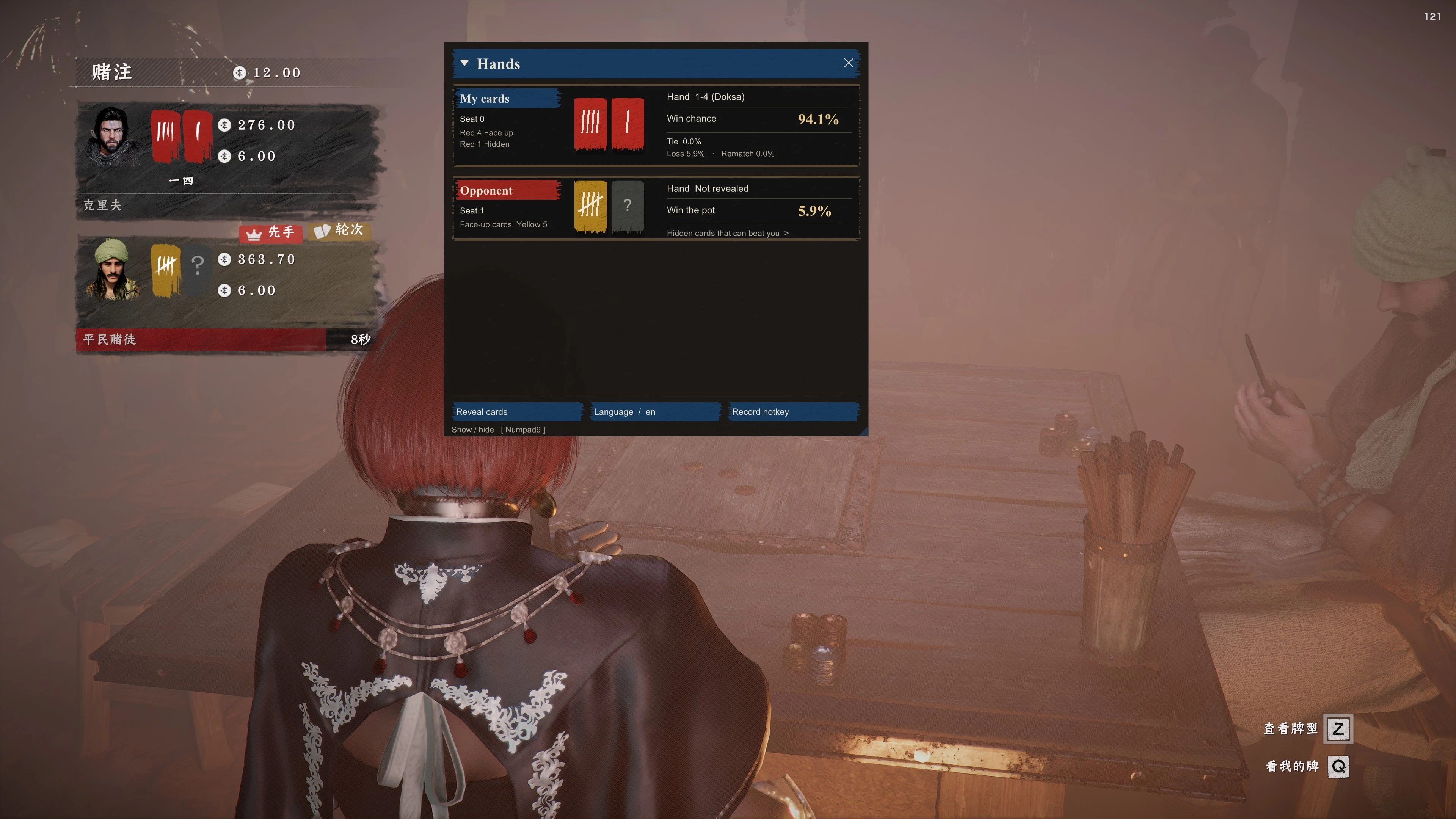
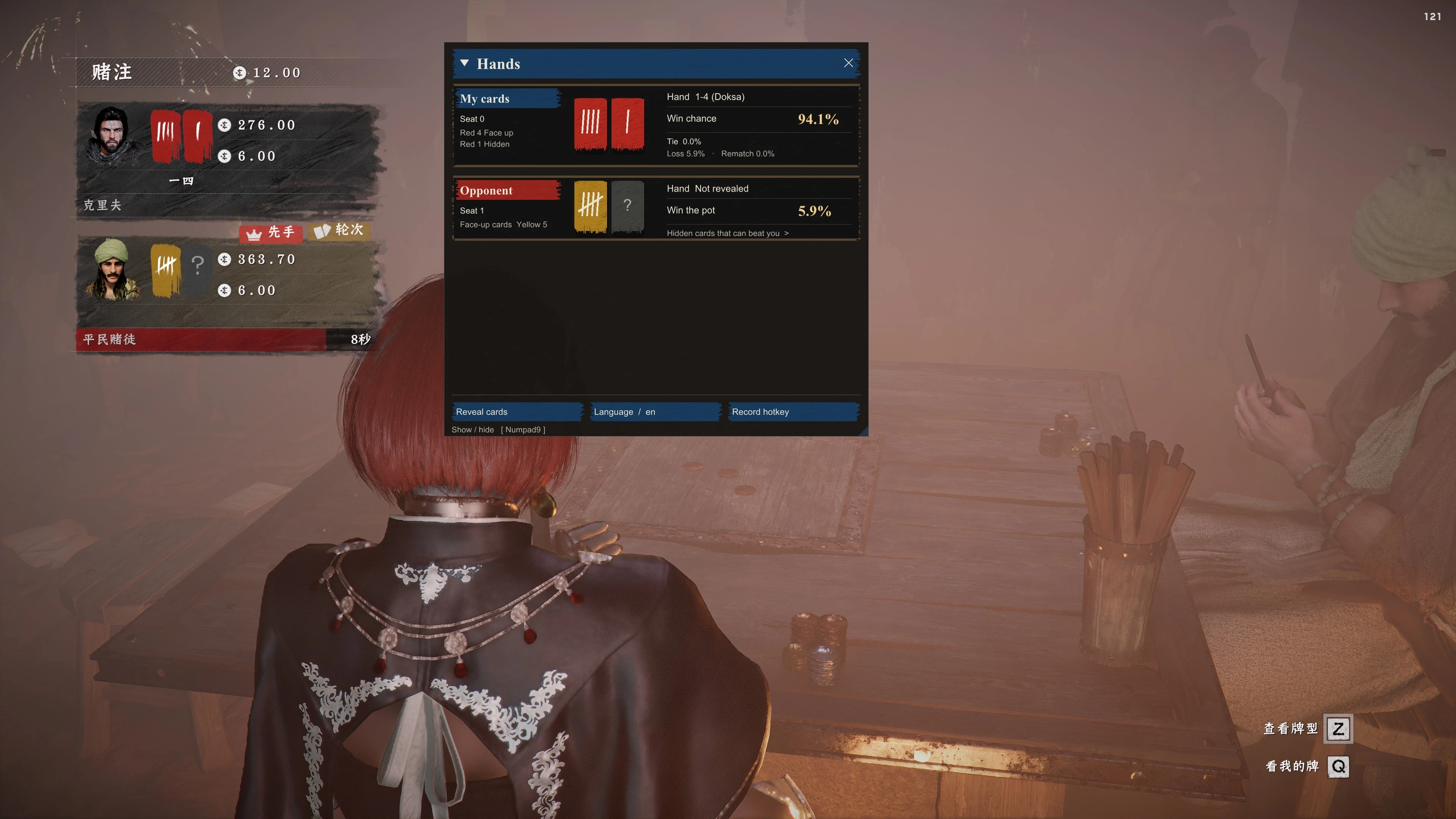
CardGameHacker 是《Crimson Desert》中 Duo 卡牌小游戏的内置辅助 MOD。它通过 DMM 的 ASI 加载器加载,显示牌面、牌型、胜率、平局率、败率、重赛率,以及对手的暗牌是否能击败本地玩家。
 查看大图
CardGameHacker — 斗牌辅助 MOD
CardGameHacker 是《红色沙漠》斗牌小游戏的辅助 MOD,帮助你查看牌面、判断牌型并比较当前手牌与藏牌组合的获胜机会。
## 主要功能
- 用图片展示自己的手牌、藏牌和对手明牌;藏牌尺寸更小,便于区分。
- 显示当前牌型、胜率、平局率、败率和重比率。
- 藏牌只能替换尚未明牌的第二张手牌。面板显示换牌后的牌型及其胜率,供换牌时参考;不会自动换牌。
- 五张牌玩法「凑整数」单独显示:左边小藏牌,右边五张牌排成一行。凑得出来时,凑数的三张下面有标记,牌型写成「九点(凑 10)」;凑不出是荒。
- 凑整数的藏牌可以换四张没亮出来的牌里的一张,但换完必须比现在大。面板给出胜率最高的一种,并标出要换的那张;没有更大的换法时显示「—」。不会自动换牌。
- 显示各对手赢下底池的概率。双人局还会列出可能压过你的暗牌。
- 支持开启窥牌,查看对手未公开的手牌及当前牌局结果。
- 支持中文、英文、日文、韩文、俄文,以及自定义显示快捷键。
## 本次更新
- 调整为更紧凑的排版:顶部显示“我的牌”或“对手1、对手2、对手3”,下方依次展示小藏牌和两张手牌。
- 移除座位行和重复的牌面说明文字,不显示头像。
- “最佳组合胜率”改为“换牌后牌型(牌型名)胜率”。只按替换第二张手牌后的那一个牌型计算;无藏牌或数据未就绪时显示“—”。
- 界面改回游戏画面内显示,导入 ASI 后按 Insert 即可打开,不用再单独运行界面程序。
- 支持五张牌玩法「凑整数」:按游戏顺序排五张牌,显示凑数标记、牌型和精确胜率。
- 隐藏界面、切换到其他程序或最小化游戏时暂停全量扫描。已经认出凑整数牌桌后,隐藏界面仍会轻量跟踪这一桌,以免错过发牌。
本版已完成本地构建和自动化测试,仍需实际游戏与不同 DMM 环境验证,暂不保证所有崩溃情况均已解决。
## 安装
只需要插件。界面画在游戏自己的画面上,不用再打开另一个程序。
1. 关闭游戏,在 DMM 中移除或禁用旧版插件,并退出旧的界面程序。
2. 将 CardGameHacker-DMM.zip 导入 DMM,启用并挂载其中的 CardGameHacker.asi。如果 ZIP 无法识别,可解压后单独导入 ASI。
3. 启动游戏,进入斗牌,按 Insert 显示面板。再按一次,或点击右上角关闭按钮,即可隐藏。
配置文件 CardGameHacker.ini 会在 ASI 旁边自动生成。更新时替换 ASI,已经改过的 ini 可以留着。窗口化、无边框和独占全屏都可以显示。若同时开着帧生成,界面会跳过那条画面,避免画错队列。
## 使用与更新
- 拖动顶部标题可移动窗口;底部可切换语言、开启窥牌和录制快捷键。
- 第一次进入牌桌可能需要稍等片刻才能识别。
- 界面随游戏加载,不需要每次重新打开一个程序。
- 更新时替换 ASI;可保留 ASI 旁边自己的 CardGameHacker.ini。
- 双人局换牌只替换第二张手牌,玩家和 NPC 相同。无藏牌或数据未就绪时,换牌后牌型和胜率显示“—”。
- 凑整数换的是四张未亮出的牌之一,而且换完必须更大。没赶上发牌、看不清哪张是明牌时,不显示换牌胜率。
## 遇到问题
如果按 Insert 没有面板,请确认 DMM 已启用并挂载这一版 ASI,并且游戏是重新启动后加载的。
反馈问题时请说明游戏版本、DMM 版本、窗口模式,以及“启动失败”“界面不显示”还是“按键后崩溃”,并附上 ASI 所在目录的 CardGameHacker.log。
## English
CardGameHacker is an assist MOD for the Duo minigame in Crimson Desert. It helps you inspect cards, identify hand types, and compare win chances for your current hand and reserve combinations.
### Features
- Shows your hand, reserve, and opponents' visible cards as images. The reserve card is smaller so it is easy to tell apart.
- Displays the current hand type plus win, tie, loss, and rematch rates.
- A reserve card can replace only the second, still-unrevealed hand card. The panel shows that one post-swap hand and its win rate as a reference. It does not swap cards automatically.
- The five-card game Make Ten has its own row: a small reserve, then five cards. When three cards make 10, 20, or 30, those three are marked and the hand reads like "9 points (make 10)". A hand that cannot make a total is a bust.
- In Make Ten, the reserve may replace one of the four cards that are not shown to the table, and only if the hand gets stronger. The panel shows the swap with the highest win chance and marks that card. It shows "—" when no swap is stronger. It does not swap cards automatically.
- Shows each opponent's chance of winning the pot. Duo also lists hidden cards that may beat you.
- Optional reveal mode to view opponents' unrevealed cards and the current round result.
- Chinese, English, Japanese, Korean, and Russian, plus a customizable display hotkey.
### What's new
- Compact layout: the heading shows "My cards" or "Opponent 1 / 2 / 3", with a smaller reserve card and two hand cards below.
- Removed seat rows and redundant card descriptions; no portraits.
- "Best-hand win" is now "after swap (hand) win". It uses only the hand formed by replacing the second card. Shows "—" when there is no reserve or data is not ready.
- The panel is drawn inside the game again. Import the ASI and press Insert; a separate interface program is no longer required.
- Make Ten is supported: five cards in table order, with the made-total mark, hand name, and exact win chance.
- Pauses a full memory scan when the panel is hidden, when you switch to another program, or when the game is minimized. After a Make Ten table has been found, hiding the panel still refreshes those few objects so the deal is not missed.
Local automated checks passed. Real-game and DMM compatibility still require testing; not all reported crashes are confirmed fixed.
### Installation
Only the plugin is required. The panel is drawn onto the game's own frame; you do not need to open another program.
1. Close the game, remove or disable older plugins in DMM, and quit any old companion program.
2. Import CardGameHacker-DMM.zip into DMM, then enable and mount CardGameHacker.asi. If the ZIP is not recognized, extract it and import the ASI by itself.
3. Start the game, enter Duo, and press Insert to show the panel. Press Insert again, or click the close button in the top-right corner, to hide it.
CardGameHacker.ini is created beside the ASI automatically. When updating, replace the ASI and keep your existing ini if you have already changed it. The panel works in windowed, borderless, and exclusive fullscreen. If frame generation is also enabled, the overlay skips that path so it is not drawn onto the wrong queue.
### Usage and updates
- Drag the title bar to move the window. At the bottom you can switch language, enable reveal, and record a hotkey.
- The first time you sit at a table, recognition may take a moment.
- The panel loads with the game; you do not need to start a separate program each time.
- When updating, replace the ASI. You can keep your own CardGameHacker.ini beside it.
- In Duo, a swap replaces only the second hand card, for both you and NPCs. When there is no reserve or the data is not ready, the post-swap hand and win rate show "—".
- In Make Ten, a swap replaces one of the four cards that were not shown, and only when the hand gets stronger. If the face-up card was not seen at the deal, the swap chance is not shown.
### Troubleshooting
If Insert does not show the panel, confirm that DMM has enabled and mounted this ASI, and that the game was restarted so the new plugin could load.
When reporting a problem, include the game version, DMM version, window mode, and whether it is "failed to start", "panel not shown", or "crash after the hotkey", and attach CardGameHacker.log from the ASI directory.
正在加载版本记录…
正在加载评论…
评论在新手盒子客户端中发表,这里同步展示。